I tested the HP OmniBook 5 vs. Dell XPS 13 — here is the budget Windows laptop I’d actually buy
Latest from Tom's Guide ·
null
Apple’s MacBook Neo sent shockwaves through the computing world when it launched at an initial price of $599. As a result, competitors quickly responded with similar budget-friendly yet premium-looking laptops. Two of the main ones I’ve reviewed are the Dell XPS 13 (2026) and HP OmniBook 5 , the subjects of this post.
Like Apple’s humble laptop, these notebooks have sturdy and colorful aluminum casings instead of the monotone, cheap plastic shells usually associated with budget laptops. These Windows machines also deliver strong performance for everyday tasks like web browsing and video streaming, plus bright displays and long battery life.
If you’re a Windows user looking for a MacBook Neo alternative, you can’t go wrong with either the Dell XPS 13 or HP OmniBook 5, as they're among the best budget laptops. But which one is truly right for you? Below, I’ll detail everything you need to know about these laptops to help you decide which one to get.
The HP OmniBook 5 14 impresses thanks to its lovely design, sharp OLED panel, strong performance, and astonishing battery life. Though it lacks HDR and has a so-so webcam, it’s a worthy alternative to the MacBook Neo for Windows users. View Deal
The Dell XPS 13 (2026) is a budget laptop with few compromises, thanks to its sturdy, lightweight aluminum design, sharp, vivid touchscreen display, strong performance, and long-lasting battery life. Starting at $749, it's easily one of the best budget Windows laptops right now. View Deal
HP OmniBook 5
Dell XPS 13 (2026)
Price
$649
$749
CPU
Intel Core 5 315
Intel Core 5 320
GPU
Intel Graphics
Intel Graphics
Display
14-inch 1920×1200 OLED
13.4-inch 2.5K (2560 x 1600) InfinityEdge touch display
Memory
8GB
8GB
Storage
256GB
256GB
Ports
1x HDMI, 2x USB-C, 1x 3.5mm headphone jack
2x USB-C
Connectivity
Wi-Fi 6E, Bluetooth 5.3
Wi-Fi 7, Bluetooth 6
Dimensions
12.3 x 8.62 x 0.46 inches
11.69 x 7.90 x 0.50 inches
Weight
2.56 pounds
2.2 pounds
The HP OmniBook 5 and Dell XPS 13 are both relatively affordable laptops, especially as we’re still in the middle of the RAM crisis that has driven up electronics prices. That’s important to keep in mind, as one of these Windows laptops has increased in price since launch.
The Dell XPS 13 originally had a sticker price of $699. Unfortunately, the starting configuration with 8GB of RAM and 256GB of storage now costs $749. Conversely, the HP OmniBook 5 starts at $649 with the same RAM and storage. At time of writing, HP is selling this configuration for $599, or the original price of the MacBook Neo.
Even if you opt for the higher-specced OmniBook 5 with an Intel Core 5 320 chip, 8GB of RAM, 512GB of storage, and a touch display, it’ll cost $749. Basically, you’d pay the same price as the starting XPS 13, but get a laptop with better specs. Right now, the HP OmniBook 5 offers better overall value.
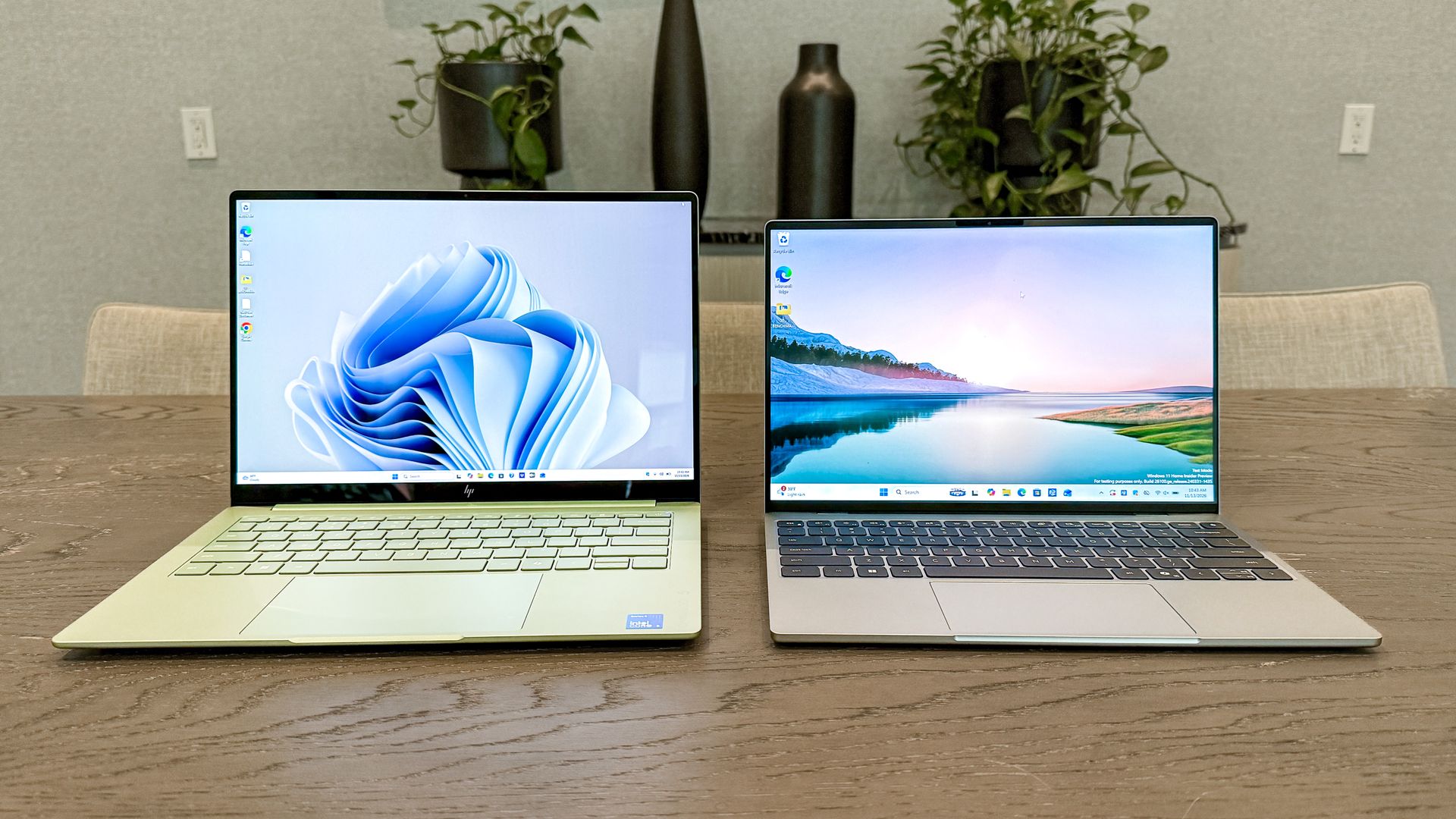
Like the MacBook Neo, the HP OmniBook 5 and Dell XPS 13 have ditched the cheap plastic designs of older budget laptops. Instead, both notebooks feature the sturdy aluminum chassis you’d see on more expensive machines. Their ultraportable designs also make them perfect for travel.
At 11.69 x 7.90 x 0.50 inches and 2.2 pounds, the XPS 13 is the smallest and lightest of the laptops I’m discussing here. Like I said in my review, Dell didn’t skimp on the XPS 13’s design, as it has the premium look you’d expect from the XPS brand. It’s also the thinnest XPS laptop ever. It comes in the relatively subdued Sky and Storm colors.
The HP OmniBook 5 is the larger of the two Windows laptops, measuring 12.3 x 8.62 x 0.46 inches. Despite its larger size, it weighs only 2.5 pounds. You can get the OmniBook 5 in one of four colors: Peony Pink, Smoke Silver, Soft Honeydew, and Starlit Blue.
HP’s laptop has the edge with port selection. While both laptops have a pair of USB-C/USB3 ports, the OmniBook 5 also has an HDMI port and a 3.5mm headphone jack.
Both laptops have excellent keyboards, but the OmniBook 5 arguably has the better one, since its keyboard deck is larger and the keys have thicker keycaps and less shallow travel distance. The touchpads on both are comparable and accurately register gestures, though the OmniBook 5's is just a tad larger.
Both laptops are sleek and elegant, but the OmniBook 5 is arguably more eye-catching thanks to its bolder color options. It also has a 180-degree hinge that goes all the way back, plus more ports than the XPS 13.
Both laptops deliver sharp image quality and vivid colors. Those are the core similarities, even though these laptops use different display technologies. Not to mention different panel sizes.
The Dell XPS 13 packs a 13.4-inch 2.5K (2560 x 1600) InfinityEdge touch display, while the HP OmniBook 5 has a 14-inch (1920×1200) OLED panel. These differences make the panels a bit tricky to compare.
The XPS 13 has a smaller IPS display, but it has a higher resolution. On the other hand, the OmniBook 5 has a lower-resolution, larger OLED display. All XPS 13 configurations have touchscreens, whereas on HP's laptop you have to pay $50 more for that feature, since touch is only available on the higher-end Core 5 chip.
HP OmniBook 5
Dell XPS 13 (2026)
MacBook Neo
Nits (brightness)
272
398 (SDR) | 420 (HDR)
452 (SDR) | 480 (HDR)
sRGB
192.4%
112.6%
110.9%
DCI-P3
136.3%
79.1%
78.6%
Delta-E
0.26
0.21
0.22
What do our display benchmarks show? As you can see in the table above, the Dell XPS 13 has the brighter screen for SDR and HDR content. HP’s laptop doesn’t support HDR. Of course, both are literally outshone by the MacBook Neo’s much brighter display.
Color reproduction numbers for the sRGB and DCI-P3 color gamuts are well above 100% on the HP OmniBook 5. That means colors are much more vivid on its display than on the XPS 13. That said, the latter’s numbers are closer to 100%, so colors are more naturalistic.
Both touchscreens are responsive and accurately capture gestures and taps. The laptops are pretty equal here, though the OmniBook 5's touchscreen might be easier to use since you can lay the display completely flat on your desk.
To be clear, the HP OmniBook 5 or Dell XPS 13 aren’t built for demanding tasks like editing 4K video or playing graphically intensive games. These Intel Wildcat Lake-powered machines are designed for everyday work like using Google Docs, browsing the web, and watching videos. Basically, if you’re a student or a remote worker with a lighter workload, the laptops are ideal.
I used both laptops for work, and each handled my typical workload: dozens of open Chrome tabs, light photo editing in GIMP, and the occasional YouTube video. I only experience noticeable slowdown when I have 15 or more Chrome tabs open. But that’s only when I’m really pushing things. For the basics, neither machine hindered me.
HP OmniBook 5
Dell XPS 13 (2026)
MacBook Neo
Geekbench 6 (single/multi-core)
2583 / 7855
2570 / 8136
3535 / 8920
Handbrake (mins: secs)
11:03
10:08
9:57
Blackmagic SSD test (write/read)
2111 / 3469
3714 / 5026
1440 / 1585
In the Geekbench 6 CPU test, both machines have comparable single-core scores, but the XPS 13 scores slightly higher in the multi-core portion. For video transcoding (HandBrake), the XPS 13 completes the task about a minute faster than the OmniBook 5. The XPS also scored better on the Blackmagic SSD test.
HP OmniBook 5
Dell XPS 13 (2026)
MacBook Neo
3D Mark Wildlife Extreme (score/fps)
2922 / 18
2995 / 17.9
3661 / 21.9
Borderlands 3
10.5 fps
10.7 fps
9.6 fps
Aside from SSD speeds, the MacBook Neo performed better overall in our performance tests. But between the OmniBook 5 and XPS 13 specifically, Dell’s notebook has the performance edge. That said, neither these Windows laptops nor the MacBook Neo is designed for high-end gaming, as the graphics and gaming benchmarks above show.
While the Dell XPS 13 might outperform the HP OmniBook 5, the latter has a huge advantage in battery life.
Time (hours: mins)
HP OmniBook 5
19:52
Dell XPS 13 (2026)
14:57
MacBook Neo
13:38
In our battery life test, which involves continuous Wi-Fi web surfing with the display set to 150 nits of brightness, the OmniBook 5 ran for 19 hours and 52 minutes! While the XPS 13 lasted an impressive 14 hours and 57 minutes (for a Windows laptop), that’s still nearly 5 hours less. The MacBook Neo doesn’t come close to matching the HP’s endurance.
The HP OmniBook 5 and the Dell XPS 13 have both raised the bar for what you should expect from budget Windows laptops. They’re both great for basic work and entertainment, just like the MacBook Neo that inspired them. For most people, either will suffice.
As for which laptop is the better MacBook Neo rival, it depends on your needs. The HP OmniBook 5 comes in various colors, has a vivid OLED panel, packs more ports, and has exceptional battery life. It also currently starts at $599 (down from $649).
Conversely, the Dell XPS 13 offers better performance, a brighter display with more natural hues, and a smaller, lighter form factor. However, it has a higher asking price of $749 than the OmniBook 5.
Again, both the OmniBook 5 and Dell XPS 13 do their jobs well. But right now, HP’s notebook arguably has the edge thanks to its more striking color options, sharp OLED panel, and lower asking price. Because of that, it's the laptop I'd buy.