I just tested Apple’s first touchscreen OLED MacBook — and I still can’t believe my eyes
Latest from Tom's Guide ·
null
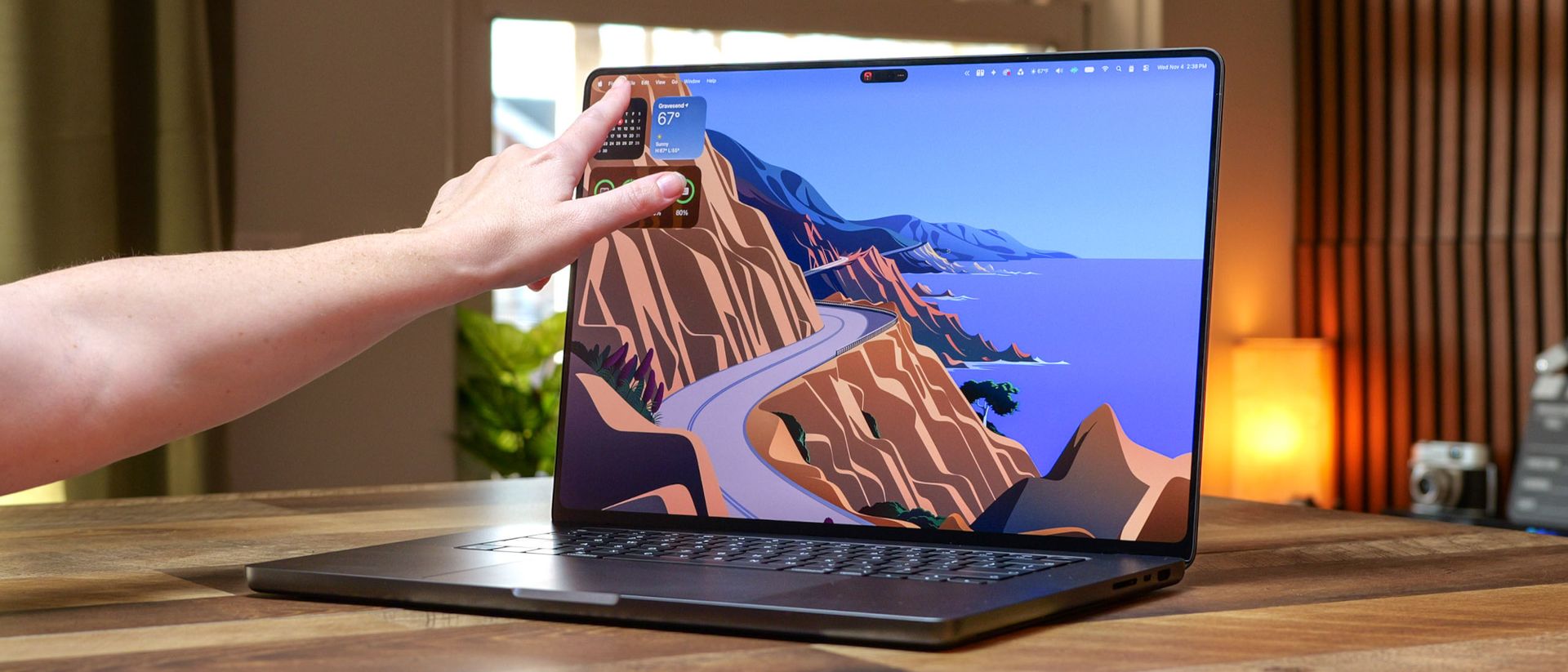
The MacBook Pro with PROLED XDR Display ($2,899 to start) is the finest laptop I’ve had the pleasure of testing. There’s a lot of hype around Apple’s first touchscreen OLED MacBook, and I can tell you it far surpasses it. Though it commands a steep asking price, I’d argue that this laptop is worth every penny for the pros thanks to the excellent experience you get.
The tandem OLED panel is a stunner, delivering inky blacks and scorching bright whites. You instantly notice the 10 million-to-1 contrast ratio, which also makes colors pop. Then there’s the touch functionality, which is the most responsive I’ve used on any touchscreen laptop. Combine these features with the Dynamic Island (finally) replacing the notch, and you have the best display ever on a MacBook. This is especially true for models with the optional anti-glare nano-texture display.
Apple didn’t stop with the upgraded display, as this MacBook Pro also has a thinner, slimmer design than its siblings. The 14-inch MacBook Pro with PROLED XDR Display weighs just a little more than a MacBook Air! You also get nearly 17 hours of battery life, blowing away the Windows competition. The cherry on top with the new design is the return of the iconic glowing Apple logo on the lid. In short, Apple somehow perfected its already stellar MacBook design.
While the MacBook Pro with PROLED XDR Display is decidedly expensive with the same performance as the MacBook Pro laptops released in March 2026, it’s easily one of the best MacBooks and best laptops you can buy. If you can afford it, you won’t be disappointed. Find out more in my full review of the 14- and 16-inch OLED MacBook Pros.
MacBook Pro w PROLED (14-inch, M5 Pro)
MacBook Pro w PROLED (16-inch, M5 Pro)
Price (starting)
$2,899
$3,399
Display
14.2-inch PROLED XDR (3024 x 1986 pixels), 120Hz, multi-touch
16.3-inch PROLED XDR (3472 x 2266 pixels), 120Hz, multi-touch
Chip
M5 Pro (15-core CPU / 16-core GPU / 16-core Neural Engine)
M5 Pro (18 CPU cores, 20 GPU cores/ 16-core Neural Engine)
Memory
24GB
24GB
Storage
1TB
1TB
Ports
3 x Thunderbolt 5, 1 x HDMI, 1 x 3.5mm headphone jack, 1 x SD card reader, 1 x MagSafe 3
3 x Thunderbolt 5, 1 x HDMI, 1 x 3.5mm headphone jack, 1 x SD card reader, 1 x MagSafe 3
Connectivity
Wi-Fi 7, Bluetooth 6, Thread (Apple N1)
Wi-Fi 7, Bluetooth 6, Thread (Apple N1)
Colors
Silver, Space Black
Silver, Space Black
Dimensions
12.24 x 8.52 x 0.59 inches
4 x 9.62 x 0.63 inches
Weight
3 pounds (M5 Pro)
4.1 pounds (M5 Max)
The MacBook Pro with PROLED XDR Display offers a premium laptop experience, with a magnificent tandem OLED panel, elegant yet utilitarian design, and intuitive touchscreen controls. There’s a lot to love here.
MacBook Pros have used the same design since late 2021. Apple hasn’t radically redesigned the MacBook Pro OLED, retaining the sturdy, squared-off aluminum chassis with rounded edges. However, the new laptops are thinner and lighter than previous models—the 14- and 16-inch MacBook Pros weigh 0.5 and 0.7 pounds less, respectively, than their predecessors. If you use MacBook Pros as often as I do, you’ll feel the weight difference the instant you pick up either new laptop.
As before, you can open the lid with one hand. This is especially noteworthy because Apple redesigned the lids to better withstand constant tapping and swiping. The lid is also noticeably thinner yet remains very sturdy and doesn’t wobble. Apple has reduced the border size by 15%, resulting in thinner bezels. Lastly, the lid features the glowing Apple logo with a dedicated backlight, signaling to everyone that you’re using a PROLED MacBook Pro.
The keyboard looks and feels the same as on other MacBook Pros I’ve tested, which is great since they’re among the best laptop keyboards. Whether it’s the 14- or 16-inch model, the keyboard deck is spacious, and the keys are highly responsive, with excellent travel and just the right amount of resistance when pressed. The huge touchpad is also as great as ever, never failing to respond to my gestures. Speaking of touch, the Touch ID button is still here for easier logins. Unfortunately, Face ID is still not supported.
You get the same array of ports here, including three Thunderbolt 5/USB-C ports, an HDMI port, a 3.5mm headphone jack, an SD card slot, and a MagSafe charging port.
Pardon the cliché, but the panel on the MacBook Pro with PROLED XDR Display is a feast for the eyes. Even our lab tester, who tests the best TVs for a living, said he has never seen a lovelier display! I wholeheartedly agree.
The latest trailer for Dune: Messiah showcases what makes the PROLED’s panel such a marvel. The superb contrast renders nighttime scenes appropriately dark, while Arakis’ scorching sun makes you squint during daytime sequences. I’m also impressed by the level of detail on the characters’ dusty faces, thanks to the sharp resolution of both models.
MacBook Pro w PROLED (14-inch, M5 Pro)
MacBook Pro w PROLED (16-inch, M5 Max)
Nits (brightness)
557.5 (SDR) | 1980 (HDR, 10% of display)
549.8% (SDR) | 1949 (HDR, 10% of display)
sRGB
118.8%
117.8%
DCI-P3
84.1%
83.4%
Delta-E
0.19
0.19
Our lab tests confirmed what my eyes saw. Apple claims the PROLED MacBook Pros can reach 2000 nits of brightness, and our display benchmarks were just a hair under that mark. The brightest laptop displays we’ve tested topped out at 1600 nits, but Apple’s notebooks go well beyond that. It’s even more impressive when you consider that images remain clearly defined even when portions of the display are set to maximum brightness.
Color reproduction (sRGB and DCI-P3) is identical on the two PROLED laptops. Color accuracy (Delta-E) is slightly better than on most of the laptops I’ve tested. Combined with the 10 million-to-1 contrast ratio, you get truly exceptional display quality.
Moving away from benchmarks, let’s discuss the other major display upgrade—the removal of the notch at the top center. While I’ve never been too bothered by the notch, I’m not sad to see it replaced with the Dynamic Island, which makes it easy to access Live Activities. I like how the Dynamic Island expands when you’re playing videos and music, and how you can use the touchscreen to stop playback, fast-forward, and rewind.
The PROLED MacBook Pro with M5 Pro supports up to three external displays (up to 6K/60Hz or 4K/165Hz), or one display up to 8K/60Hz, 5K/120Hz, or 4K/240Hz paired with a second up to 5K/120Hz or 4K/200Hz. The M5 Max model steps this up to four external displays (up to 6K/60Hz or 4K/165Hz), or two displays up to 8K/60Hz, 5K/120Hz, or 4K/240Hz.
Both chips can power the laptop's built-in PROLED XDR screen at full resolution at the same time. Thanks to Thunderbolt 5’s native DisplayPort 2.1 bandwidth, you can connect three or four external monitors through a single port using compatible docks or daisy-chaining.
As we detailed in our 10 things you need to know about the MacBook Pro OLED , most laptops use a separate, distinct digitizer to support touch input. Apple found a way to integrate the touch silicon directly into these laptops’ tandem OLED displays. The result? A super precise touchscreen experience.
I’ve tested dozens of Windows touchscreen laptops, but none have felt as responsive or intuitive as on the MacBook Pro OLED. Because of that, tapping, swiping, and even pinch-to-zoom are as smooth and snappy as on an iPad Pro.
I’ve tested dozens of Windows touchscreen laptops, but none have felt as responsive or intuitive as on the MacBook Pro OLED. Because of that, tapping, swiping, and even pinch-to-zoom are as smooth and snappy as on an iPad Pro. I didn't notice any input lag. Menu bar items expand under your fingertip, and window controls get bigger, making things easier to see and interact with.
So far, I haven’t encountered any compatibility issues with third-party apps. Google apps, such as Docs and Drive, work well with touch based on my testing. And naturally, Apple’s own apps work seamlessly. I’ll keep testing to see if I run into any issues, but so far macOS seems like a natural fit for touch.
I don’t often use touch controls on laptops with touchscreens because they can feel clunky, but I found myself using the MacBook Pro’s touch controls more than I expected. That’s a testament to how well touch is implemented on these laptops.
MacBook Pros have always featured excellent speakers that deliver incredible sound, but even that experience didn’t prepare me for how amazing the speakers are on the new MacBook Pro OLED laptops.
Apple says the enhanced six-speaker sound system now delivers 50 percent deeper bass. And that’s not just marketing bluster. It was the first thing I heard, or rather, felt , when I fired up Tommy Johansson’s cover of Black Sabbath’s “Headless Cross.” The rumbling bass notes beneath the ripping solos and soaring vocals made it feel like a live performance—and no doubt annoyed my neighbors when I had the volume cranked up.
The movie trailer for the latest Godzilla Minus Zero also sounds spectacular on the MacBook Pro with PROLED XDR Display. Explosions, screams, and Godzilla’s iconic roar all came through loud and punchy. And naturally, voices in dialogue-heavy content like the Triple K.O. podcast also sound impressive.
Speakers can almost feel like an afterthought on some laptops, but that’s certainly not the case here. Whether it’s the 14- or 16-inch MacBook Pro, your ears won’t be disappointed. The sound system on these laptops is every bit as impressive as the display.
Even if the M5 Pro and M5 Max chips in the new OLED MacBook Pros aren’t technically new like the Apple M6 chip , they’re still the most powerful M-series chips available for MacBooks. Since these are the same chips we’ve already tested on the 14- and 16-inch MacBook Pros from March, these laptops deliver comparable performance.
The 14-inch MacBook Pro with PROLED XDR Display Apple sent us (valued at $3,699 as configured) has an M5 Pro chip with an 18-core CPU / 20-core GPU, 48GB of RAM, a 1TB SSD, and a glossy display.
Meanwhile, the 16-inch model I reviewed (valued at $8,549) packs an M5 Max chip with an 18-core CPU / 40-core GPU, 128GB of RAM, a 4TB SSD, and a nano-texture display. Thanks to those specs, both laptops pack a serious performance punch.
MacBook Pro w PROLED (14-inch, M5 Pro)
MacBook Pro w PROLED (16-inch, M5 Max)
Dell XPS 16 (2026)
Lenovo Yoga 9n
Geekbench 6.7 (single-core/multi-core)
4,323 / 29,219
4,359 / 30,327
2,839 / 16,975
2,974 / 18,181
Geekbench 7 (single-core/multi-core)
3739 / 34,412
3,766 / 35,679
N/A
2,550 / 21,344
Geekbench AI (Quantized Core ML/Neural Engine)
64,428
64,473
58,170
Not optimized for this test.
On the Geekbench CPU benchmark, both the 14- and 16-inch PROLEDs delivered strong single- and multi-core scores. They also scored well in Geekbench’s AI benchmarks.
As you can see above, OLED touchscreen competitors like the Dell XPS 16 (currently $2,469) and Lenovo Yoga 9n (currently $2,999) don’t come close in performance. For your reference, the XPS 16 packs an Intel Core Ultra X7 358H CPU, 32GB of RAM, and a 1TB SSD, while the Yoga 9n has an Nvidia RTX Spark N1X chip, 32GB of RAM, and a 1TB SSD.
MacBook Pro w PROLED (14-inch, M5 Pro)
MacBook Pro w PROLED (16-inch, M5 Max)
Dell XPS 16 (2026)
Lenovo Yoga 9n
Blackmagic SSD (write/read)
10,950 / 13,194
13,334 / 12,782
3,570 / 4,600
3,501 / 4441
Handbrake (video transcoding)
1:50 (mins: secs)
1:40 (mins: secs)
4:03 (mins: secs)
2:01 (mins: secs)
PugetBench (Photoshop)
17,493 (score) | 7.73 (minutes)
18,431 (score) | 7.75 (minutes)
N/A
11,589 (score) | 11.32 (minutes)
PugetBench (Premiere Pro)
105,651 (score) | 6.13 (minutes)
155,248 (score) | 4.47 (minutes)
38,708 (score) | 14.70 (minutes)
83,016 (score) | 7.91 (minutes)
Surprise, surprise, the MacBook Pro with PROLED XDR Display also crushed it in our other benchmarks. Disk speeds are extremely zippy, and the same is true for video transcoding. In fact, the new MacBook was more than 2x as fast as the Dell XPS 16.
Apple’s MacBook PROLED laptops are also more than capable of handling tasks in Adobe creative apps like Photoshop and Premiere Pro. Again, the competition can’t keep pace with Apple’s notebooks.
MacBook Pro w PROLED (14-inch, M5 Pro)
MacBook Pro w PROLED (16-inch, M5 Max)
Dell XPS 16 (2026)
Lenovo Yoga 9n
3DMark Wild Life Extreme Unlimited (score / fps)
23,562 / 141
45,137 / 270
9,468 / 57
21,667 / 129
The PROLEDs aren’t slouches at gaming. On the 3DMark Wild Life Extreme Unlimited GPU benchmark, the laptops scored well, with the M5 Max model performing significantly better thanks to its beefy 40-core GPU. The RTX Spark-powered Yoga 9n didn’t do badly, but Apple’s Pro laptops still outclassed it in this benchmark.
For real-world gaming, I tested Cyberpunk 2077 on both PROLED models. With the “For This Mac” graphics setting, the game ran at 85 fps and 95 fps, respectively. Cyberpunk 2077 is a graphically demanding game that pushes even powerful PCs to their limits, so these results are very impressive.
MacBooks with M-series chips are among the longest-lasting laptops we’ve ever tested. But I wasn’t expecting this kind of endurance, since there appears to be no “power penalty” for Apple adding an OLED touchscreen.
In Tom’s Guide’s battery life test, which involves continuous web surfing over Wi-Fi with the display set to 150 nits of brightness, the 14-inch MacBook Pro PROLED lasted 16 hours and 56 minutes, while its 16-inch counterpart endured 21 hours and 24 minutes. The previous non-touch 16-inch MacBook Pro M5 Pro lasted 21:10. This is yet another test in which Windows laptops are handily outclassed.
Time (hours: mins)
MacBook Pro w PROLED (14-inch, M5 Pro)
16:56
MacBook Pro w PROLED (16-inch, M5 Max)
21:24
Dell XPS 16 (2026)
13:02
Lenovo Yoga 9n
10:32
We always run three battery tests to calculate an average time, but we could only run one test in time for this review. I’ll update once we’ve completed the full testing, but based on my experience, the final results will be just as epic.
The webcam on the new PROLED MacBooks is mostly the same as before, only with a new stabilization feature to prevent screen wobble if you’re actively using the touchscreen display. As before, the camera can record 1080p video and also has Desk View.
The 12-megapixel Center Stage camera is as great as ever. This photo I took in my apartment late at night captures all the details on my face, clothing, and even in my background. During a Google Meet session, colleagues on the call also said my video looked sharp.
The new MacBook Pros come with macOS Golden Gate installed. Like I said in my macOS Golden Gate review, this update isn’t a complete overhaul like macOS Sequoia, but it brings a slew of new and enhanced AI features and smoother overall performance that make using MacBooks feel more personal and streamlined.
macOS Golden Gate now includes a dedicated Siri AI app that works like a typical chatbot. In a dedicated chat window, you can ask Siri AI questions or talk to it about whatever’s on your mind. Siri is baked into the OS, so it can recognize what’s on your screen and do things like add items to your calendar or create shortcuts by speaking what you want instead of building them manually.
A new Liquid Glass UI slider lets you adjust the effect’s opacity more precisely. You’ll also notice that complex background visuals appear more diffused, improving text readability. Icon edges are more pronounced so they stand out more. This feature should have been in Sequoia, but at least it’s here now in Golden Gate.
Another highlight of macOS Golden Gate is Spatial Reframing, which is also available on iOS and iPadOS. Reframe lets you reframe existing photos and adjust the perspective to your liking. If you’ve taken a lot of photos with your iPhone or iPad, this feature is a great way to make them look exactly how you want.
macOS Golden Gate goes big on AI, especially with the new and improved Siri. If that doesn’t matter to you, you’ll still enjoy a smooth, stable macOS experience overall.
The new OLED MacBook Pros are easily the most impressive laptops I’ve ever tested, but all those amazing features come at a steep cost.
I wasn’t expecting the MacBook Pro with PROLED XDR Display to be cheap, given all the high-end components it uses. That said, I can’t help but wonder how much these laptops would have cost without RAMageddon inflating electronics prices. I suppose that doesn’t matter, because in this reality, you’ll have to pay a premium for Apple’s high-end touchscreen laptop.
Tech enthusiasts or anyone who can be more productive with a touchscreen laptop will get their money’s worth with the PROLED MacBook Pros. If you want to save money on a MacBook Pro and don’t need the performance of the M5 Pro/M5 Max chips, or if an OLED touchscreen isn’t important to you, the new M6-powered 14-inch MacBook Pro starts at $1,999. That’s also expensive, but still $900 less than the entry-level MacBook Pro PROLED.
Since the MacBook Pro with PROLED XDR Display uses the same M5 Pro and M5 Max chips as the regular MacBook Pros we’ve tested, performance gains are negligible at best. This matters if you're considering upgrading from those MacBook Pros to the new touchscreen laptops.
MacBook Pro 16-inch M5 Pro
MacBook Pro w PROLED (14-inch, M5 Pro)
MacBook Pro 14-inch M5 Max
MacBook Pro w PROLED (16-inch, M5 Max)
Geekbench 6.7 (single-core/multi-core)
4,306 / 28,586
4,323 / 29,219
4,338 / 29,439
4,359 / 30,327
Geekbench AI (Quantized Core ML/Neural Engine)
57,420
64,428
N/A
64,473
Blackmagic SSD (write/read)
8,989 / 12,711
10,950 / 13,194
12,857 / 12,870
13,334 / 12,782
Handbrake (video transcoding)
1:45 (mins: secs)
1:50 (mins: secs)
1:55 (mins: secs)
1:40 (mins: secs)
3DMark Wild Life Extreme Unlimited (score / fps)
23,653 / 141
23,562 / 141
44,334 / 265
45,137 / 270
I selected some benchmarks I discussed earlier to show you how these MacBook Pros compare in performance. As you can see, the gains are minor at best. So unless you are set on owning a touchscreen OLED MacBook, it might be wiser to save your money for future iterations that deliver a substantial performance boost over what you currently own.
I thought the MacBook Pro with PROLED XDR Display could be amazing, but it shattered and exceeded my expectations. The new tandem OLED display raises the bar for laptops in brightness and color reproduction. Smooth touchscreen controls, a lighter design, and booming audio take Apple’s new machine to the next level. Yes, it’s very expensive, but it’s a brilliant laptop that makes competitors pale in comparison.
Apple’s first attempt at a touchscreen MacBook is mostly a success, but I’m already curious to see what future iterations bring to the table. If this initial laptop is anything to go by, we’re in for some truly fantastic devices. For now, Apple has made good with these laptops. They truly are the best of the best.