Forget the Apple Magic Mouse — I’ve been testing this ergonomic mouse with macOS trackpad-like controls and I’m seriously impressed
Latest from Tom's Guide · · g2653822
Nikita is a Senior Writer on the Reviews team at Tom's Guide. She is a lifelong gaming and photography enthusiast, especially interested in wildlife photography. Having worked as a Sub Editor and Writer for Canon EMEA, she’s a bit of a grammar nerd (and a supporter of the Oxford comma), and has also interviewed photographers from all over the world and working in different genres. A holder of two master’s degrees, the most recent one being in Magazine Journalism from Cardiff University, Nikita’s work has appeared in several publications such as Motor Sport Magazine, NME, Marriott Bonvoy, The Independent, and Metro. Her favorite tech includes the PS5, the DJI Air 3S, and the Fujifilm X-T50. She's also a licensed drone pilot and cameras expert so you'll find her testing those nearly every week. In her downtime, Nikita can usually be found sinking hours into RPGs on her PS5, flying a drone, out on a walk with a camera in hand, at a concert, watching F1, or planning her next tattoo. You can follow her photography account on Instagram here .
BenQ is no stranger to making some of the best monitors for macOS users, and now, the computing giant is venturing into the peripherals realm with INFTYLAB, a sub-brand dedicated to macOS accessories. I’ve spent a week using the BenQ INFTYLAB M Mouse PS01 which hopes to replace your Apple Magic Mouse, and I have to say: I’m impressed.
The PS01 delivers a smooth and responsive tracking experience, and it features dual scrolling wheels to streamline your workflow. In addition to that, you can map macOS gestures to its buttons via its user-friendly companion software. The mouse is ergonomic and comfortable, too, and it’s essentially the antithesis of the Apple Magic Mouse.
While it isn’t without its flaws, it’s arguably one of the best mice around. For the complete breakdown, read my full BenQ INFTYLAB M Mouse PS01 review.
Price
$119 / £89
Max DPI
6,000
Polling rate
1,000Hz (2.4GHz, wired); 125Hz (Bluetooth)
Buttons
Five
Size
4.53 x 2.85 x 1.63 inches
Weight
3 ounces / 85g
Colors
White
Body material
Plastic
Design
Right-handed ergonomic
Operating system
macOS
Connectivity
Wired, 2.4GHz dongle, Bluetooth
Battery
500mAh rechargeable
Battery life (rated)
60 days
Lighting
No
There’s a lot to like about the BenQ INFTYLAB M Mouse PS01. It’s very comfortable and ergonomic, and sublime for productivity — especially if you’re a macOS user.
There aren’t many macOS-first mice out there, and chances are, you’ve been recommended the Apple Magic Mouse ($79) to accompany your iMac, MacBook, what-have-you. But we all know that Apple’s first-party mouse is an ergonomic nightmare, and as someone who spends up to eight hours a day, five days a week at her desk, I can’t overstate the importance of an ergonomic mouse.
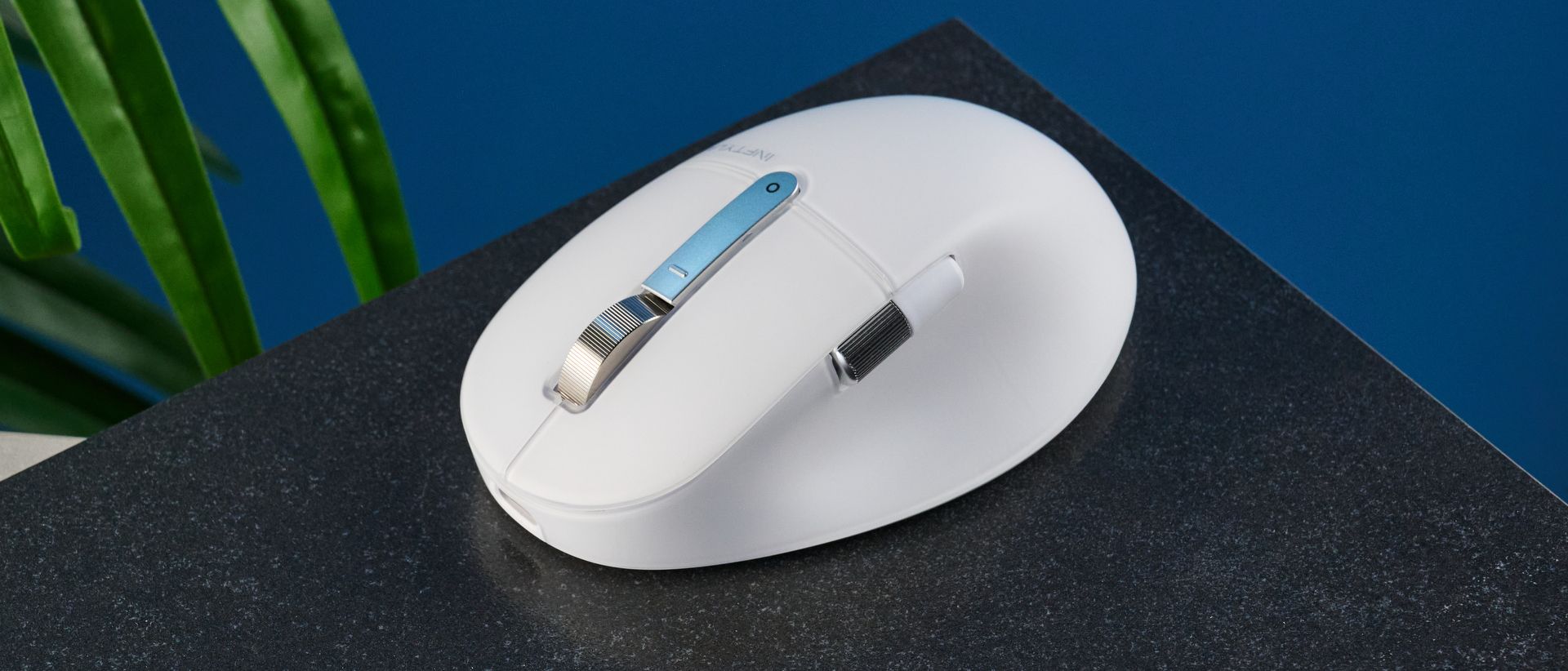
The BenQ INFTYLAB M Mouse PS01 is the perfect Magic Mouse alternative, primarily because it doesn’t hurt your hand or wrist. Measuring 4.53 x 2.85 x 1.63 inches, the PS01 is ideal for those with small- or medium-sized hands. The mouse has some height to it, similar to the Logitech MX Master 4 ($119), and my palm sat comfortably atop it. I found the PS01’s thumb rest very comfortable, too. Even after a full day of using the mouse, I didn’t feel any pain or discomfort in my hand, wrist or arm.
Another thing I love about the PS01 is its exceptional build quality. At 3 ounces, the mouse is lighter than the Logitech MX Master 4 (5.29 ounces) and the Logitech Signature Comfort Plus M850L ($49, 3.8 ounces), but it feels substantial in the hand, and doesn’t feel poorly built either. It uses high-quality plastic and aluminum (in its scroll wheel) to deliver a wonderful rodent. As a macOS peripheral, it feels and looks the part.
The BenQ INFTYLAB M Mouse PS01 is a productivity powerhouse, and is superb for anyone who spends their work week at a desk. In addition to its buttons that you can assign macOS gestures to, you get two scroll wheels. A vertical scroll wheel is located on the top, between the left- and right-click buttons, and a horizontal wheel is placed on the side.
As their names suggest, the free-moving top wheel enables up and down vertical scrolling, while the side wheel moves the cursor from side to side. As someone who navigates large spreadsheets and sometimes very long Slack threads, I love that the dual wheels streamline my workflow. I don’t really have to take my hand off the mouse and use my MacBook’s built-in trackpad for anything now.
And this brings me, very nicely, to my next point…
If you’re thinking the BenQ INFTYLAB M Mouse PS01 features a touch-sensitive shell like the Apple Magic Mouse, I’m going to stop you right there. While it doesn’t feature a Multi-Touch surface, all of its buttons are customizable — and you can assign your trackpad-like gesture of choice to two of them.
By default, the top button (located right behind the scroll wheel) is programmed to take a screenshot. Meanwhile, the back button (located next to the horizontal scroll wheel) toggles Mission Control which displays all open windows. These can be customized via INFTYLAB Glide (more on that shortly). For example, I used the software to assign App Exposé to the back button as that’s something I use often when working on my MacBook Air M2 .
I’ve found the buttons highly responsive. I love the tactile feedback they give when pressed. This applies to the other buttons, too. The left- and right-click buttons are not only quiet so they don’t disturb your coworkers, but they also feel tactile and not too soft. You get a maximum DPI of 6,000 which essentially increases the speed of your cursor. The PS01’s movements are smooth and fluid. Overall, it delivers an exceptional tracking experience.
The BenQ INFTYLAB M Mouse PS01 is accompanied by the INFTYLAB Glide software, available for free on macOS as well as Windows. It looks and behaves like Logi Options+ and that’s no bad thing — it’s a compliment!
Sporting a clean interface with zero intrusive pop-ups or ads, Glide enables you to assign trackpad and Multi-Touch gestures to the PS01’s buttons. You can also adjust the mouse’s DPI (between 400 and 6,000), and of course, update its firmware.
You can also assign Quick Pie to one of the buttons, which displays your most-used commands in a circular menu, negating the need to memorize shortcuts. Once you’ve customized the mouse and selected your chosen settings, you can use the PS01 with any macOS device, as it saves the profile into its internal memory.
I had to really nitpick to find flaws in the BenQ INFTYLAB M Mouse PS01 — that’s because it’s a standout mouse. One thing worth noting is that there’s no left-handed version, and the mouse is a little expensive.
If I had a nickel for every time I tested an ergonomic mouse that was designed for right-handed people only, I would have a few. I’m right-handed but I know left-handed folks, and work with one, too, and I know she isn’t happy about the BenQ INFTYLAB M Mouse PS01 being available in both orientations. I feel like if you’re making an ergonomic mouse, you have to consider both left- and right-handed users.
Like I said, this isn’t the first time I’ve encountered this issue. Other ergonomic mice, like the Logitech MX Master 4 and the Keychron M6 8K, come in the right-handed orientation only. It’s just a shame that the PS01 costs nearly $120 and isolates between 10% and 12% of the global population .
If you’re on a budget, the BenQ INFTYLAB M Mouse PS01’s price tag might put a frown on your face. It has a retail price of $119 at B&H U.S. / £89 at BenQ U.K. , which makes it one of the most expensive productivity mice I’ve tested — and the same price as the Logitech MX Master 4. In comparison, the Apple Magic Mouse starts at just $79 at Amazon U.S. , but it’s nowhere near as ergonomic or comfortable as the PS01.
But turn that frown upside down because cheaper alternatives are available. The Keychron M6 8K is an MX Master 4 dupe and costs just $69, while the Keychron M7 is available for $49. You can also grab the Logitech MX Master 3S which is often on sale for around $79 at Amazon U.S. Of course, all of these mice are system-agnostic and don’t feature macOS-specific gestures, and the PS01 is worth the investment for its seamless Apple integration alone.
For BenQ’s first macOS-specific mouse, the BenQ INFTYLAB M Mouse PS01 feels like a triumph. Its minimalist design makes it fit right into Apple’s ecosystem, and unlike the Apple Magic Mouse, it’s extremely comfortable and ergonomic. It’s equipped with dual scroll wheels, maximum DPI of 6,000 for smooth tracking, and you can even map macOS gestures to its buttons.
It isn’t perfect, though, as there’s no left-handed version, and it’s accompanied by a premium price tag. However, these flaws are overshadowed by everything else the PS01 does right. User-friendly companion software and productivity-first features make the mouse a great fit for any setup. At the end of the day, the PS01 is designed to streamline your workflow, and it excels at that.