I just tried Apple’s new iMac with M6 and this sleek all-in-one is so seamless I’m ready to ditch my Mac mini
Latest from Tom's Guide ·
Anthony Spadafora is the managing editor for security and home office furniture at Tom’s Guide where he covers everything from data breaches and malware to password managers and the best way to cover your whole home or business with a strong Wi-Fi signal. Before joining the team, he spent three years covering cybersecurity and B2B tech for ITProPortal while living in South Korea. After moving back to the US. Anthony joined the TechRadar Pro team where he covered these topics along with VPNs, web hosting, online collaboration software and video conferencing for four years. Anthony also has his ears to the ground and is on the lookout for the next major cyberattack or data breach. Based in Houston, Texas, Anthony also handles VPN testing for both Tom’s Guide and TechRadar. As someone who has worked from home exclusively since 2018, he has reviewed dozens of standing desks as well as office chairs and has taken a closer look at other essential remote working accessories. As part of these reviews, Anthony frequently builds intricate desk setups which is why he’s such a big advocate for cable management and keeping things organized. When he’s not writing, he can be found tinkering with PCs and game consoles, managing cables and making upgrades to his smart home.
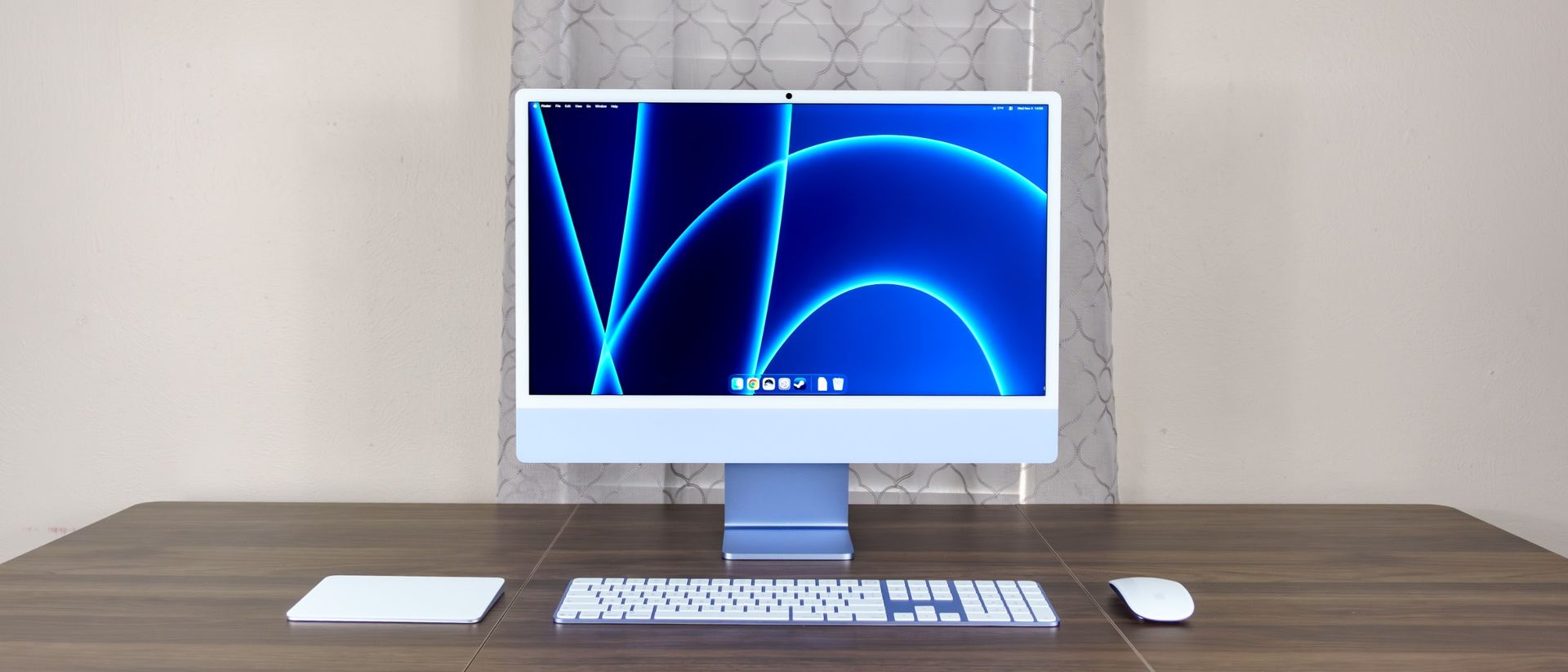
Apple’s new iMac with M6 might look identical to its predecessor at first glance, but it’s the extra power and improved connectivity under the hood that make this upgraded all-in-one desktop continue to stand out.
Instead of drastically altering the iMac, Apple has kept more or less the same design since 2021 when the 24-inch model first debuted. Just like with the iMac M4, you’re still getting a 24-inch 4.5K Retina display, a 12MP Center Stage webcam, and two or four Thunderbolt 4 ports at the back depending on which configuration of the new M6 chip you choose.
Similarly to the Mac mini M6 I reviewed, Apple’s M6 chip and its N1 wireless chip are the big upgrades here. While I wish there were other changes to its design — like an optional height-adjustable stand or a larger screen size — the iMac with M6 is a reliable and powerful desktop that’s incredibly simple to set up thanks to its one-cable solution. Also, unlike Apple's Studio Display monitors, the power cable is detachable, which makes cable management a breeze.
Besides being one of the best all-in-one computers , it’s also the only one that can be configured with a matte finish thanks to Apple’s optional nano-texture glass. However, is it worth upgrading from an older Mac or ditching your existing desktop setup for something more seamless? Find out in my full Apple iMac with M6 review.
iMac with M6
iMac with M6 (as tested)
Price
$1,499, £1,499, AU$2,399
$1,699, £1,699, AU$2,699
CPU
M6 (10-core CPU, 10-core GPU)
M6 (12-core CPU, 12-core GPU)
RAM
16GB (up to 24GB)
16GB (up to 24GB or 32GB)
Storage
256GB (up to 512GB or 1TB)
256GB (up to 512GB, 1TB or 2TB)
Display
24-inch 4.5K Retina display
24-inch 4.5K Retina display
Ports
2 x Thunderbolt 4, 1 x 3.5mm headphone jack
4 x Thunderbolt 4, 1 x 3.5mm headphone jack
Camera
12MP Center Stage camera
12MP Center Stage camera
Connectivity
Wi-Fi 7, Bluetooth 6, Thread
Wi-Fi 7, Bluetooth 6, Thread, 2.5 Gigabit Ethernet built into power adapter
Accessories
Magic Keyboard, Magic Mouse
Magic Keyboard with Touch ID, Magic Mouse
Size
21.5 x 18.1 x 5.8 inches
21.5 x 18.1 x 5.8 inches
Weight
9.7 pounds (4.42 kg)
9.8 pounds (4.44 kg)
The iMac with M6 is an elegant desktop that’s sleek and compact enough to fit into almost any space. What truly makes it shine, though, is the added muscle from Apple's M6 chip and the upgraded connectivity of the N1 — along with the fact that it remains the only all-in-one computer you can buy with an optional matte display.
The iMac with M6 that Apple sent over for review arrived in a single large box, complete with a blue fabric handle to match the desktop’s light blue colorway. Along with the computer itself, you get everything you need to start using it right away as it comes with a Magic Keyboard and a Magic Mouse.
Besides the color-matched USB-C to USB-C cable and power adapter with an Ethernet port built in that comes with the higher tier model, I really appreciated the fact that Apple includes a microfiber cloth in the box for keeping its screen fingerprint and smudge free.
The iMac with M6’s stand comes pre-attached, so there’s nothing to put together. There’s a white .5-inch border that wraps all the way around its 24-inch display along with a larger, 2-inch chin at the bottom. On the very top of the device, there’s a 12MP webcam with microphone holes on the back.
Then on the backside of the iMac with M6, there’s a hole at the top of the stand to route its power cable through along with two or four Thunderbolt 4 ports on the left side depending on which configuration you choose.
Around the corner from the power button on the back right, there’s a 3.5mm audio jack on the edge for connecting wired headphones. When you're sitting in front of the iMac, that puts the jack on your front-left — a small detail, but I really like that the cable from my headphones didn’t get in the way when using the included Magic Mouse. Though if you’re left-handed, this could be an issue if you frequently use wired headphones.
Unlike the Mac mini M4 or Mac mini M6 I’ve used previously, I just had to plug in that single power cable and power the iMac with M6 on to get started. From there, I used the included USB-C cable to pair the keyboard and mouse and I was good to go.
Although this is the first Apple all-in-one I’ve tested, the iMac with M6 felt incredibly fast and responsive right from the get go. In fact, it was a very similar experience to how it felt to upgrade from the previous Mac mini to the new Mac mini M6 and as you might have guessed, this is all thanks to Apple’s new M6 chip.
As you can see in our benchmark testing below, the change from using a 3nm process on the M4 to a 2nm process on the M6 — though literally small — makes a huge difference in terms of performance. For instance, in our Geekbench tests, we saw almost a 1,000 point single-core increase while multi-core performance jumped more than 5,000 points.
iMac M6
iMac M4
Geekbench 6.7 single-core
4553
3,646
Geekbench 6.7 multi-core
20,038
14,724
BlackMagic Disk Speed (read)
6,594.6 MB/s
2,895.2 MB/s
BlackMagic Disk Speed (write)
6,751.9 MB/s
3,045.6 MB/s
Handbrake (Mins:Secs)
3:20
5:03
Apple has also upgraded the SSD storage in this new iMac, resulting in significantly faster read and write speeds. For those interested in video editing on the iMac with M6, this will save you a ton of time as our Handbrake encoding test (which measures how long it takes the computer to transcode a 4K video file down to 1080p) dropped by nearly two minutes, down from 5:03 on the iMac M4 to just 3:20 on the iMac M6.
The new M6 chip isn’t the only upgrade under the hood though, as this is also the first iMac with Apple’s proprietary N1 networking chip built in. Alongside Wi-Fi 7 and Bluetooth 6 support, it also adds native Thread support so your iMac can act as a Thread border router and directly communicate with your smart home gear.
These are all big upgrades you’ll notice in your day-to-day experience with the iMac M6 and you can read more about them in my Mac mini M6 review. However, with one of the best mesh Wi-Fi systems with Wi-Fi 7 support, I saw gigabit speeds over Wi-Fi when running a few speed tests.
I could take that even further by running an Ethernet cable from my router to the iMac with M6’s power adapter as my review unit has a 2.5 GbE port built-in. It’s worth noting that while the base model doesn’t come with one, you can pay an extra $30 for the iMac power adapter with an Ethernet jack if you prefer the reliability and added speeds you get over a wired connection.
As we saw with the iMac M4 a few years ago, Apple has made serious progress when it comes to gaming on Mac and this is even more evident with the new iMac with M6. While the base model has a 10-core GPU, the upgraded one has a 12-core GPU, but both are great for gaming if you keep your expectations in check.
Given that I previously played Control on the Mac mini with M6 on Apple’s Studio Display XDR at the office, I wanted to see how Remedy’s third-person supernatural shooter played on the iMac with M6’s 4.5K Retina display at home.
Just like before, I did have to drop the resolution down to 1440p, but the game looked crisp and ran smoothly on Apple’s M6 chip. If you don’t mind sacrificing even more resolution, scaling down to 1080p gives you an even bigger performance boost across a wide variety of titles compared to the M4 chip.
In the time since I tested the Mac mini with M6, I picked up Stray on sale specifically to see how it runs on macOS. After booting up the game and playing through the intro, I’d say the iMac with M6 handled it surprisingly well.
While these are both somewhat newer titles, if you have a large backlog of Steam games you haven’t gotten around to finishing yet, the iMac with M6 could be the perfect way to play them. Even with the in-game resolution turned down, its display looks fantastic and the six-speaker system — with two pairs of force-cancelling woofers and two high-performance tweeters — helps bring the action to life too.
When the iMac with M6 was first revealed and I found out that Apple wasn’t going to bump up its screen size from 24 inches to 27 or even 32 inches, I was slightly disappointed. With the release of the new MacBook Pro with PROLED XDR , I think we might finally see a screen size bump to accommodate touch support in the next iMac — but that will be at least a few years away.
Now back to the iMac with M6, though I was initially disappointed it still had a smaller, 24-inch screen, it ended up taking me completely by surprise. Given that I do most of my work in a web browser with two side-by-side Chrome windows (each with dozens of tabs open simultaneously), I thought I wouldn’t be able to multitask the way I’m used to on the iMac with M6. Thanks to its higher 4.5K resolution though, I had more than enough screen real estate to do so quite easily.
iMac M6
iMac M4
Apple Studio Display
Average brightness (nits)
473.4
450
538.2
Peak brightness (nits)
497 (center)
508 (center)
551 (center)
sRGB color gamut
108.7%
108.2%
117.3%
DCI-P3 color gamut
77%
76.6%
83.1%
Delta-E
0.3
0.2
0.21
The iMac with M6 is also slightly brighter than the older M4 variant based on our display tests. Colors are vibrant and both pictures and video appear very sharp too. I had no trouble at all editing photos in GIMP and all of my pics were color accurate on its display as well.
Since the iMac with M6’s speakers are so punchy, I decided to test its display further by watching The Wild Robot and a bit of Godzilla vs. Kong. In DreamWorks’ animated film, the robot Roz’s metallic body looked clean and crisp while Brightbill’s yellow feathers and the rest of the island’s foliage really popped.
Now if you’re partial to matte displays like I am and can’t stand seeing glare on a glossy screen, the iMac is the only all-in-one with this option available. This upgrade will set you back an extra $200 — but if you plan on using the iMac with M6 in a room with a lot of ambient light or near a window, it’s absolutely worth it.
Even though its design remains unchanged, the iMac with M6 packs in enough extra power to make it a worthwhile upgrade, especially from an older iMac with an M1 or M2 chip. Still, it does have its downsides — including a fixed-height stand that still can't be adjusted and a higher starting price over the previous model.
Let’s face it, there’s no computer or all-in-one that looks as good and features a design as iconic as Apple’s iMac. However, looks aren’t everything — and this is especially true coming from someone who also reviews home office furniture for a living.
Although you can tilt the display about 5 degrees forward or 25 degrees back, when it comes to ergonomics, this isn’t ideal. Instead, just like on Apple’s Studio Display, I’d love to see an optional height-adjustable stand for the iMac M6 too.
Sure, you can easily use a desk shelf or monitor stand to rectify this issue, but one of the main reasons someone buys an iMac over another all-in-one or a Mac mini is for the aesthetics. As I’m using one of the best standing desks from Uplift Desk for my Mac mini M6 setup, I was able to raise the desk itself to get the screen at a more ergonomic height. However, doing so makes typing on the included Magic Keyboard worse, since my forearms were tilted up instead of resting straight.
There’s something about seeing the color-matched accessories and stand together on a completely clutter-free desk that’s just really striking with an iMac. Having to ruin that look with an extra stand — or buy another accessory just to fix basic neck strain — stings even more when you take into account the other big downside with the iMac M6.
With its gorgeous display and simple setup, Apple’s iMac has always made an excellent family computer. You could set one up in a home office or even out in the living room and the entire household could use it for checking emails, managing calendars, watching videos, browsing the web or even playing games.
Thanks to RAMageddon though, the iMac with M6 starts at $1,499 — which puts a big dent in any family’s budget. Similar to the Mac mini M6, this new iMac is $200 more than its predecessor, and that’s without factoring in the additional cost of extra memory and storage. Upgrading from the base model’s 16GB of unified memory up to 24GB is an extra $200, and it’s the same story when you go from 256GB to 512GB of storage.
Add in the power adapter with Ethernet, a Magic Trackpad instead of a mouse, and a Magic Keyboard with Touch ID, and the iMac becomes a premium purchase quite quickly. Granted, it’s a machine you will be able to use for years to come with its appliance-like reliability — but still, foregoing yet another price hike would have been nice for the iMac with M6.
The iMac with M6 remains the sleekest and easiest-to-set-up all-in-one desktop you can get. There’s no other Mac or Windows machine like it, and if you want a computer that looks as good as it performs, you won’t be disappointed. The new M6 chip and the inclusion of the N1 chip give the iMac M6 a significant power and connectivity boost that make it an easy upgrade to recommend for anyone holding on to an older iMac.
Even then, I would have liked to see some tweaks to its now five-year-old design — like a larger screen or, more practically, the option to configure it with a height-adjustable stand. Still, if you don’t want to fuss with an external monitor, webcam, and loose cables, and just want a machine that works straight out of the box, the iMac with M6 is an iterative but worthwhile upgrade.