The LG UltraGear 25G590B sounds like overkill with its 1,000Hz refresh rate — but after testing it, every other monitor feels sluggish
Latest from Tom's Guide · · g2653822
Nikita is a Senior Writer on the Reviews team at Tom's Guide. She is a lifelong gaming and photography enthusiast, especially interested in wildlife photography. Having worked as a Sub Editor and Writer for Canon EMEA, she’s a bit of a grammar nerd (and a supporter of the Oxford comma), and has also interviewed photographers from all over the world and working in different genres. A holder of two master’s degrees, the most recent one being in Magazine Journalism from Cardiff University, Nikita’s work has appeared in several publications such as Motor Sport Magazine, NME, Marriott Bonvoy, The Independent, and Metro. Her favorite tech includes the PS5, the DJI Air 3S, and the Fujifilm X-T50. She's also a licensed drone pilot and cameras expert so you'll find her testing those nearly every week. In her downtime, Nikita can usually be found sinking hours into RPGs on her PS5, flying a drone, out on a walk with a camera in hand, at a concert, watching F1, or planning her next tattoo. You can follow her photography account on Instagram here .
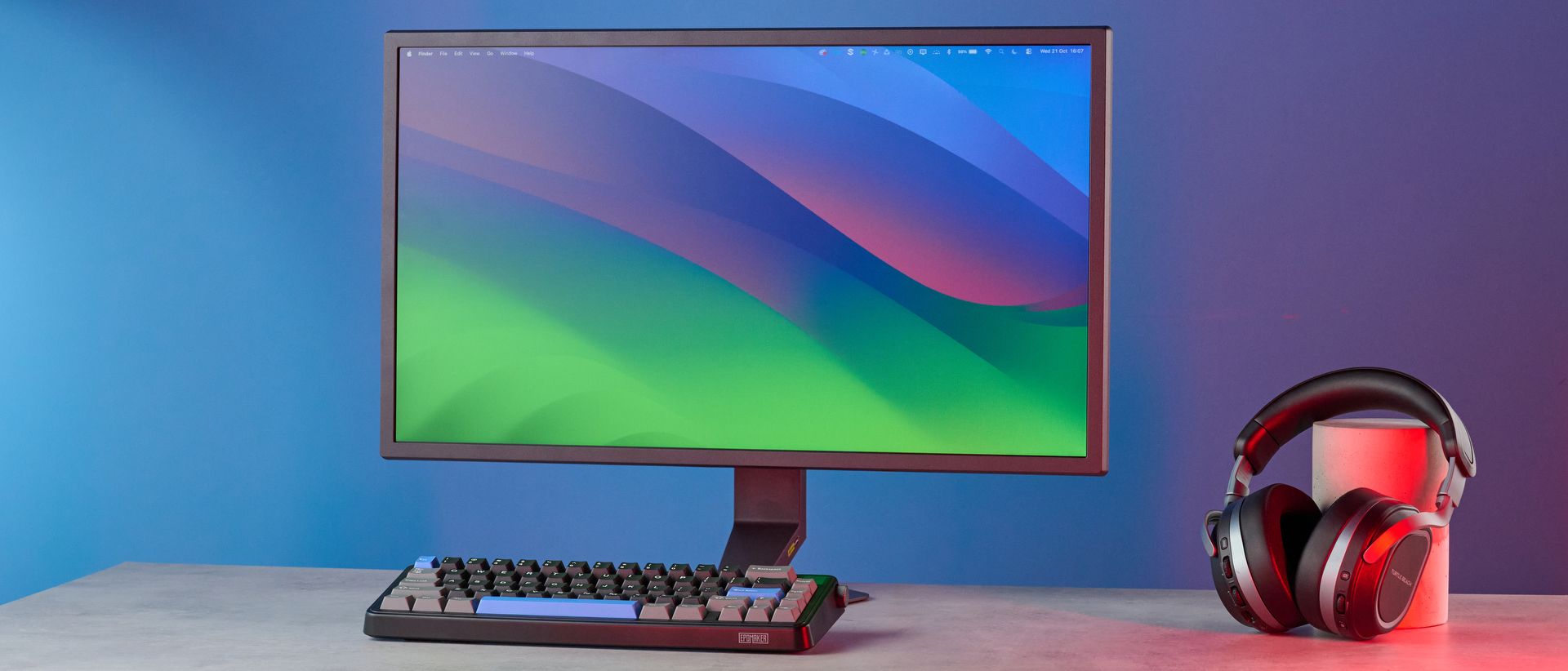
Few monitors are like the LG UltraGear 25G590B. While most monitors top out at 320Hz, and some at 720Hz, the 25G590B kicks it up a notch to a whopping 1,000Hz, making it one of the best gaming monitors for esports. Strong color coverage and accuracy stuffed into a bright 25-inch panel makes for a winning combination. The monitor itself looks sleek and premium.
But is it perfect? Not really. Its FHD panel (which is the competition standard) doesn’t make the monitor an all-rounder. And while its 1ms response time is fine, many of its competitors perform far better with their 0.03ms or even 0.02ms response times. The monitor isn’t the cheapest either, priced at $999.
So, should you still buy it, despite its flaws? Find out in my full LG UltraGear 25G590B review.
Price
$999 / £899
Display
25-inch
Resolution
1920 x 1080 (FHD)
Aspect ratio
16:9
Refresh rate
1,000Hz; 1,100Hz (Overclock)
Response time
1ms
Panel type
IPS
Color depth
8-bit
DPI
90
Backlight
W-LED
Inputs
Power, 2x HDMI 2.1, 1x DisplayPort 2.1, 1x USB-C (upstream), 1x 4-pole headphones/mic jack
Dimensions
22.5 x 20.1 x 8.2 inches (with stand)
Weight
11.46lbs (with stand)
There’s a lot to love about the LG UltraGear 25G590B, from its excellent gaming performance (bolstered by its 1,000Hz refresh rate) and its strong color coverage, to its sleek and practical design.
Supplied by: MSI | Tom's Guide CPU: AMD Ryzen 7 7700X | Graphics card: MSI RTX 5070 Ti 16GB Vanguard SOC | Motherboard: MSI B850E Gaming Plus WiFi | RAM: Kingston Fury Renegade DDR5 32GB | Cooler: Noctua NH-U12S | PSU: MSI MEG Ai1300P PCIE5 | Case: MSI MPG GUNGNIR 110R
First things first, let’s talk about the LG UltraGear 25G590B’s headline feature, and that’s its 1,000Hz refresh rate, achievable at 1080p.
That’s one thousand frames every second. Let that sink in.
In comparison, the LG UltraGear 27GX790B-B ($994) and the Sony Inzone M10S II ($1,099) hit only 720Hz at 720p. 1,000Hz is overkill for most gamers but if you’re an esports player looking for speed above all else, this is the monitor for you. Also, you’ll need a powerful machine to hit that frame rate — I’m talking RTX 50-series graphics cards, at the very least. You’ll need a GPU that supports the latest Displayport 2.1 standard, too. Our gaming rig couldn’t achieve 1,000fps in any game I played.
Even so, the gaming and visual experience was nothing short of sublime. You get a 1ms response time, which is slower than that of the Sony Inzone M10S II (0.2ms) and the LG UltraGear 27GX790B-B (0.2ms), but that’s because the 25G590B features an IPS panel versus the rival OLEDs, which shift pixel color more quickly. Though I didn’t experience much motion blur or ghosting, I have my qualms — but I’ll discuss that later in the “The Downs” section.
Back to the good things for now. In Forza Horizon 5 , which is a highly graphic-intensive game, I hit 250fps while racing. This was with the graphics set to Extreme (Ray Tracing enabled and all). Movement was buttery smooth without any choppines, and it had me wondering how I’d go back after using the 25G590B. Counter-Strike 2, on the other hand, ran at 490fps with graphics set to High, and this jumped to a whopping 840fps when I dropped the graphics to Low.
Similar to the Sony Inzone M10S II, the LG UltraGear 25G590B features a range of gaming features designed for esports players. Via the OSD (On-Screen Display) and joystick, you can toggle an on-screen crosshair. The target point is then fixed in the center to enhance shooting accuracy — something I found useful in Counter-Strike 2 where some weapons lack an ADS mode. The on-screen crosshair helped me aim more accurately in both Counter-Strike 2 and Cyberpunk 2077 .
There’s also a Black Stabilizer mode which boosts shadows without affecting lighter areas of the screen. You get AI Scene Optimization, too, which automatically adjusts key picture settings, like color temperature and sharpness, to match the content type — whether that’s work-related tasks, gaming, or movies. In my testing, it worked as described.
And of course, there’s NVIDIA G-Sync and AMD FreeSync for minimizing tears and lags. Overall, this is a competent and powerful esports monitor that doesn’t give you too much to complain about.
Alongside its phenomenal gaming performance, the LG UltraGear 25G590B boasts wide color coverage and accuracy, too. To my eyes, colors in Forza Horizon 5 appeared vivid — though not as vibrant or rich as on an OLED panel. Blacks appeared dark in Cyberpunk 2077 but, again, not as inky as on an OLED screen.
Panel type
sRGB
DCI P3
Delta-E
LG UltraGear 25G590B
IPS
135.8%
96.2%
0.14
Alienware AW2524H
IPS
113%
80.7%
0.14
Sony Inzone M10S II
OLED
185.8%
131.6%
0.26
LG UltraGear 27GX790B-B
OLED
177%
125.4%
0.33
Lenovo Legion Pro 32UD 4K
OLED
186.2%
131.9%
0.35
MSI MPG 341CQR QD-OLED X36
QD-OLED
166.3%
117.8%
0.15
MSI MAG 272QP QD-OLED X50
QD-OLED
192.9%
136.7%
0.11
MSI MPG 272URX
QD-OLED
131%
97%
0.15
As you can see in the table above, the 25G590B covers 135.8% of the sRGB color space and 96.2% of the wider DCI P3 gamut, upstaging the Alienware AW2524H ($829) — also an IPS panel — in both spaces. 100% coverage is ideal, so the 25G590B does more than enough. You also don’t want coverage to reach too high, as that can then make colors appear oversaturated. None of that here, though — the 25G590B delivers a pleasing viewing experience.
I then measured color accuracy which is represented by Delta-E. It scores the difference between the source color and what appears on the monitor. Lower scores mean higher fidelity, with values near zero representing near-perfect accuracy. In my lab tests, the 25G590B achieved a Delta-E score of 0.14, which is excellent. It’s either on par with or better than its IPS as well as OLED rivals.
In addition to its strong color coverage and accuracy, the LG UltraGear 25G590B’s panel is bright, especially in its SDR mode.
Panel type
Peak brightness (SDR)
Peak brightness (10% window size, HDR)
LG UltraGear 25G590B
IPS
387
310
Alienware AW2524H
IPS
346
429
Sony Inzone M10S II
OLED
231
146
LG UltraGear 27GX790B-B
OLED
249
561
Lenovo Legion Pro 32UD 4K
OLED
193
419
MSI MPG 341CQR QD-OLED X36
QD-OLED
280.2
413
MSI MAG 272QP QD-OLED X50
QD-OLED
289.6
284
MSI MPG 272URX
QD-OLED
254
449
In my lab tests, the 25G590B achieved a peak brightness of 387 nits in SDR and 310 nits in HDR (10% window size). Its SDR performance is better than the IPS Alienware AW2524H, and every other OLED competitor, as you can see in the table above. Low brightness is a limitation of OLED and QD-OLED panels, though, so this is expected.
In real-world use, I found the 25G590B plenty bright in both SDR and HDR modes. I wouldn’t recommend playing with the brightness turned all the way up anyway, as it can potentially harm your eyes.
Right before I started writing this review, I was testing the LG UltraGear 52G930B ($1,697), a gigantic 52-inch monitor that I struggled to carry up and down the stairs. The LG UltraGear 25G590B is its antithesis. It feels featherlight in comparison, and I was so relieved when I managed to pick it up with just one hand as it weighs just 11.46lbs (with stand).
As the numbers in its name suggest, the 25G590B is a 25-inch monitor, and it measures 22.5 x 20.1 x 8.2 inches with the stand attached. This makes it perfect for small spaces. It’s a little smaller than the 27-inch Sony Inzone M10S II, its chief rival, but the trade-off is that you’re getting a ridiculous 1,000Hz refresh rate (more on that shortly).
The 25G590B is sleek and practical. Similar to the Sony Inzone M10S II, LG’s offering features a cantilevered stand which channels the weight into the center, keeping everything balanced and resulting in the monitor using a small circular base. This also frees up space on your desk, giving you more room for freely positioning your keyboard. The stand’s height can be adjusted and the screen titled, and it can also swivel where it’s attached to the base.
Unlike productivity-focused monitors, like the BenQ Creative Pro PD2730S ($1,199) or the Dell UltraSharp U3226Q ($2,499), ports are fairly stripped-back on the LG UltraGear 25G590B — but they’re more than sufficient for hooking up your peripherals. Located next to the power port on the monitor’s rear panel, you’ll find dual HDMI 2.1 and a DisplayPort 2.1 ports, as well as a USB-C upstream port and a 4-pole headphone/mic jack.
Surprisingly, though, there aren’t any USB-A ports on the 25G590B. I don’t really have an issue with that, though, as I keep my keyboard and mouse plugged into our gaming rig’s motherboard. Hey, at least the 25G590B has a modern Type-C port and not an outdated Type-B one, like on the Sony Inzone M10S II.
Though the LG UltraGear 25G590B is powerful, it isn’t without its flaws. It features an IPS FHD panel, and its response time tops out at 1ms only. Oh, and it’s expensive!
This is a complaint similar to the one I had about the LG UltraGear 52G930B. Frustratingly, the LG UltraGear 25G590B doesn’t feature an OLED panel, and its IPS panel’s resolution tops out at 1920 x 1080 Full HD (FHD). Its IPS panel has a 1,000:1 contrast ratio which means that blacks don’t appear inky, while OLED panels typically deliver pitch-black dark scenes.
It’s also important to note that the 25G590B has a 1920 x 1080 FHD resolution. While this is the competition standard and is great for fast gaming, it falls short for everything else. If you’re looking for a monitor that can do everything — gaming and work — the 25G590B won’t be ideal. A monitor that has an FHD competition crop, like the Sony M10S II, will be more suited to at-home gamers, or aspiring esports players.
That, very nicely, brings me to my next point: the LG UltraGear 25G590B’s 1ms response time. Though that should suffice in casual gaming, high-speed camera pans and rapid movements can produce pixel trails or subtle blur. The monitor has a Motion Blur Reduction feature, yes, but it doesn’t make much of a difference aside from reducing the monitor’s brightness.
On the other hand, 0.03ms or 0.02ms response times on OLED panels offer dramatically sharper response. Combine that with better resolutions, better visuals, and better overall performance, and you’ve got yourself a winner. Again, for that reason, the LG UltraGear 27GX790B-B and the Sony Inzone M10S II make for better investments. Even the MSI MPG 341CQR QD-OLED X36 ($949) with its 360Hz refresh rate would be my port of call over the 25G590B.
Finally, let’s talk about the LG UltraGear 25G590B’s price. Retailing for $999 at Adorama U.S. / £899 at Currys U.K. , the 25G590B costs a lot for an IPS FHD monitor. Sure, you get a 1,000Hz refresh rate and that won’t come cheap in any world, but it’s also an IPS panel. For just $100 more, you could pick up the Sony M10S II ($1,199) which features an OLED panel and offers a 24.5-inch competition crop as well as an FHD mode.
But of course, if it’s sheer speed you’re after and you want the fastest monitor possible, $999 feels like a fair price to pay. Would you ? Let me know in the comments below!
None other monitor does what the LG UltraGear 25G590B can — at the time of writing, at least. It packs a blazing fast 1,000Hz refresh rate, making it a phenomenal monitor for esports players and competitive gamers. It sports a lovely, sleek design that doesn’t take up too much space, and color coverage and brightness doesn’t give you much to complain about.
But things you can complain about? The 25G590B features an IPS FHD panel, and I really wish it was OLED and 4K — something many of its competitors offer for the same price. Also, it’s got a 1ms response time only which is fine for most gamers, but its OLED rivals offer faster 0.03ms (and sometimes even 0.02ms) response times.
If that doesn’t bother you (or you can afford it), and you really, really want to run Counter-Strike at over 800fps, then there’s no better monitor than the 25G590B.