Genkit CLI & Dev UI 1.43: Improved human-in-the-loop testing and log viewing
Genkit | Blog ·
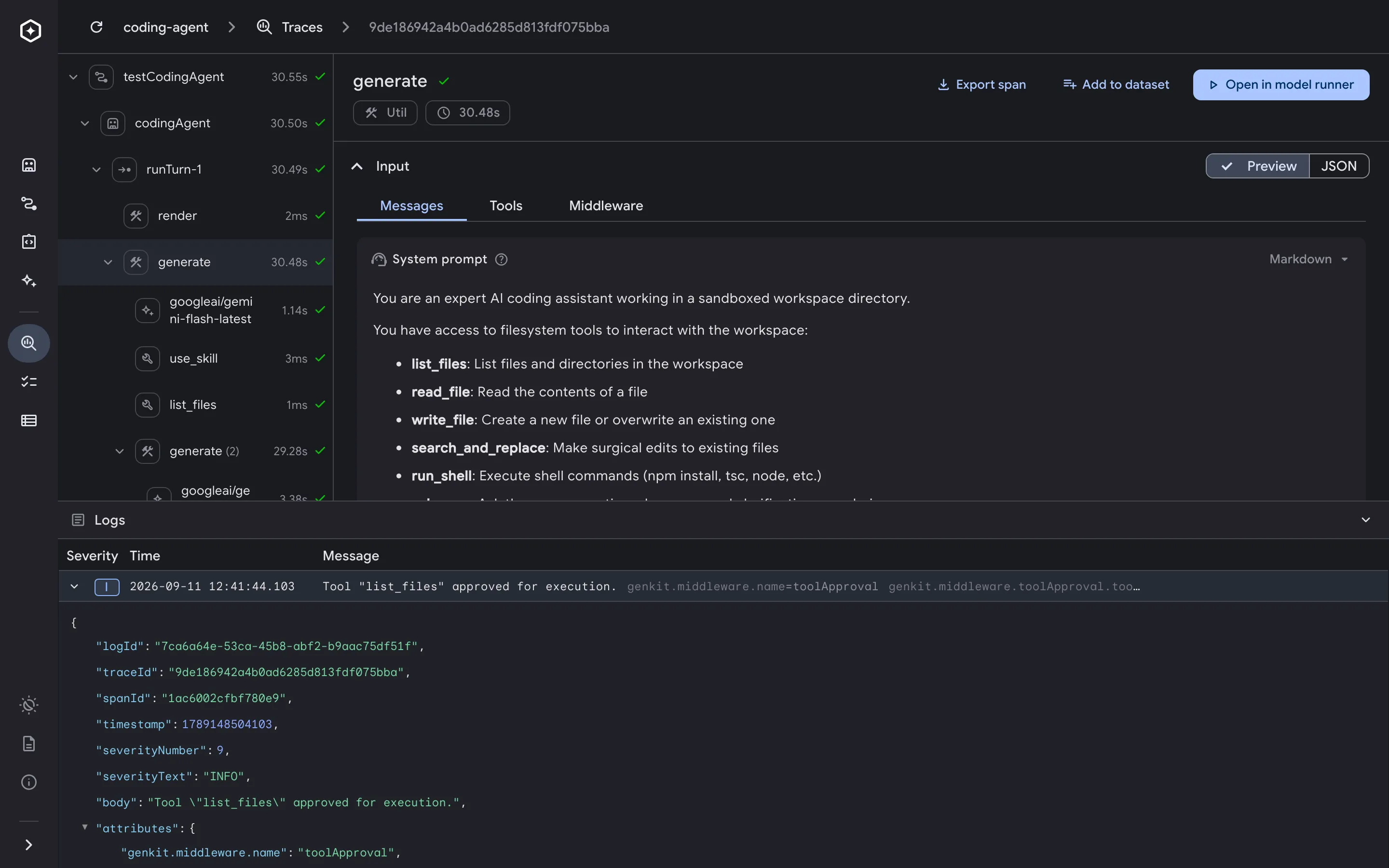
Genkit CLI and Developer UI 1.43 makes it easier to test human-in-the-loop agents and inspect execution logs in both the browser and the terminal.
Genkit CLI and Developer UI 1.43 makes it easier to test human-in-the-loop agents and inspect execution logs in both the browser and the terminal. You can now step through multiple tool interrupts in the Agent Runner, view execution logs alongside trace spans in a dedicated bottom drawer, and query logs from your terminal or coding agent with genkit log:list .
To install or upgrade to the latest version, run the following command in your terminal:
curl -sL cli.genkit.dev | bash Step through human-in-the-loop interrupts in the Agent Runner When an agent pauses execution for human review or external signoff, it often queues multiple pending tool calls within the same turn, such as reserving both a flight and a hotel before generating a final itinerary. Built on an interactive stepper, the Agent Runner now groups interrupted tool calls into a single Action Required card so you can inspect and resolve each request in order.
You can step forward and backward through pending tool requests using the Next and Previous controls, inspect the proposed input arguments, and choose how to resolve each call:
When you reach the final tool request in the stepper, clicking Resume (or Submit responses in manual tool response mode) submits all tool resolutions together so the agent can complete its turn.
Previously, trace logs lived inside a section within the right-hand Span Details panel, requiring you to scroll past lengthy span inputs and outputs to inspect log messages. In 1.43, the Logs panel has been promoted to an always-visible, resizable, collapsible bottom drawer spanning the full width of the Trace Viewer.
This layout lets you inspect the span execution tree, span details, and correlated runtime logs simultaneously. Each row displays a severity badge, timestamp, and an inline preview of structured key-value attributes. Clicking any entry expands its full structured JSON payload together with its correlated traceId and spanId .
The new genkit log:list CLI command queries execution logs directly from the local telemetry server. This makes logs easy to inspect from your terminal and directly accessible to AI coding agents (such as Antigravity, Claude Code, or Cursor) for agent-driven debugging without copying payloads out of the browser.
You can filter logs by trace ID, span ID, or minimum severity (for example, --severity info returns INFO and above):
genkit log:list --trace-id 7b8e9a01c2d3e4f5a6b7c8d9e0f1a2b3 --severity info By default, genkit log:list prints newest entries first in a readable summary format:
Found 3 logs: ID: 9f4a21c0-88b1-4e2a-9c14-0a1b2c3d4e5f Span ID: 1000000000000006 Severity: WARN Time: 9/17/2026, 7:01:41 PM Message: Turn interrupted awaiting human approval Attrs: pendingTools=2, cluster=us-central1 --- ID: 7956edb0-15ac-4a78-a419-fcf698326392 Span ID: 1000000000000004 Severity: INFO Time: 9/17/2026, 7:01:41 PM Message: Canary verification passed Attrs: status=HEALTHY, p99LatencyMs=42 --- ID: cce5e07e-c686-4069-95da-efb18265f796 Span ID: 1000000000000002 Severity: INFO Time: 9/17/2026, 7:01:40 PM Message: Saved session checkpoint snap-20260917-01 Attrs: sessionId=sess-prod-rollout-9941 --- Also in this release Python OTLP debug log streaming. Running Python workflows under genkit start now streams debug and higher lifecycle logs from ai.generate() to the Developer UI over OTLP while keeping your terminal output at the configured GENKIT_LOG level. Composite badges for agent companion spans. Trace views now display composite two-icon badges ( robot + secondary icon) for background agent actions including agent-snapshot , agent-wait , and agent-abort . Bundled multipart artifact downloads. When an agent session artifact contains multiple files, downloading it from the Artifacts panel now bundles all parts into a single .zip archive instead of downloading files individually. Java and Kotlin runtime detection. The CLI and telemetry server automatically detect java projects when pom.xml , build.gradle , or build.gradle.kts files are present in the project root. Accessibility and theme refinements. Improved keyboard and screen-reader accessibility across trace and navigation views, and synchronized JSON editor colors across light and dark themes. Get started Upgrade to Genkit CLI and Developer UI 1.43 today to try human-in-the-loop agent stepping, the Trace Logs drawer, and genkit log:list . Explore the Genkit Developer Tools documentation for guides, or read the full 1.43.0 release notes on GitHub .