I added Flipper’s Busy Bar to my desk months ago and this retro-style smart display is a productivity gadget in disguise
Latest from Tom's Guide ·
Anthony Spadafora is the managing editor for security and home office furniture at Tom’s Guide where he covers everything from data breaches and malware to password managers and the best way to cover your whole home or business with a strong Wi-Fi signal. Before joining the team, he spent three years covering cybersecurity and B2B tech for ITProPortal while living in South Korea. After moving back to the US. Anthony joined the TechRadar Pro team where he covered these topics along with VPNs, web hosting, online collaboration software and video conferencing for four years. Anthony also has his ears to the ground and is on the lookout for the next major cyberattack or data breach. Based in Houston, Texas, Anthony also handles VPN testing for both Tom’s Guide and TechRadar. As someone who has worked from home exclusively since 2018, he has reviewed dozens of standing desks as well as office chairs and has taken a closer look at other essential remote working accessories. As part of these reviews, Anthony frequently builds intricate desk setups which is why he’s such a big advocate for cable management and keeping things organized. When he’s not writing, he can be found tinkering with PCs and game consoles, managing cables and making upgrades to his smart home.
The right gadget on your desk can make all the difference for the task at hand, and I think I’ve finally found a smart display that’s more helpful than distracting.
Sure, my monitor and computer will always be the main fixtures on my desk, but the smaller accessories I swap in and out of my setup can make a real difference in my day-to-day routine.
For instance, I added a Google Nest Hub Max underneath my ultrawide monitor a few years ago. While it was great for getting answers to quick questions, controlling my smart home, and checking feeds from my security cameras, having videos, music, and media just a voice command away made it easy to drift off task.
Although I eventually swapped out that smart display for a portable monitor to gain extra screen real estate, part of me still missed having a dedicated clock right on my desk. What I didn’t expect, though, was to find a simple desk clock with the smarts of a display and a built-in Pomodoro timer.
To top it off, the Busy Bar I’ve had on my desk for the past few months comes from Flipper — the same company behind the iconic Flipper Zero pentesting tool. Here’s everything you need to know about this unique gadget that works just as well on your desk as it does mounted on your monitor.
If you’re looking to swap out noisy touchscreens for a simple, focus-first desk display, Flipper’s Busy Bar brings a tactile edge to staying on task. Packing dual front-and-back screens, a built-in Pomodoro timer, mechanical switch controls, and automatic macOS meeting sync, it offers a surprisingly fun desk companion. Add in its fold-out monitor feet, open-source API, and 3D-printable design files for custom mounts, and you get a uniquely hackable status light that fits right into any modern workspace setup. View Deal
At 6.64 x 2.17 x 1.61 inches, Flipper’s new Busy Bar won’t take up much space on your desk at all. Just like the Flipper Zero, it comes in white with orange accenting, which I found to be just playful enough without being overly distracting.
In the box, you get the Busy Bar alongside a color-matched braided USB-C cable. While the device can run on its battery for around eight hours — or up to two weeks on standby — I found it easiest to leave it plugged into a USB power adapter underneath my desk. (If you use a Mac, you can also connect it directly to your computer, but more on that later.)
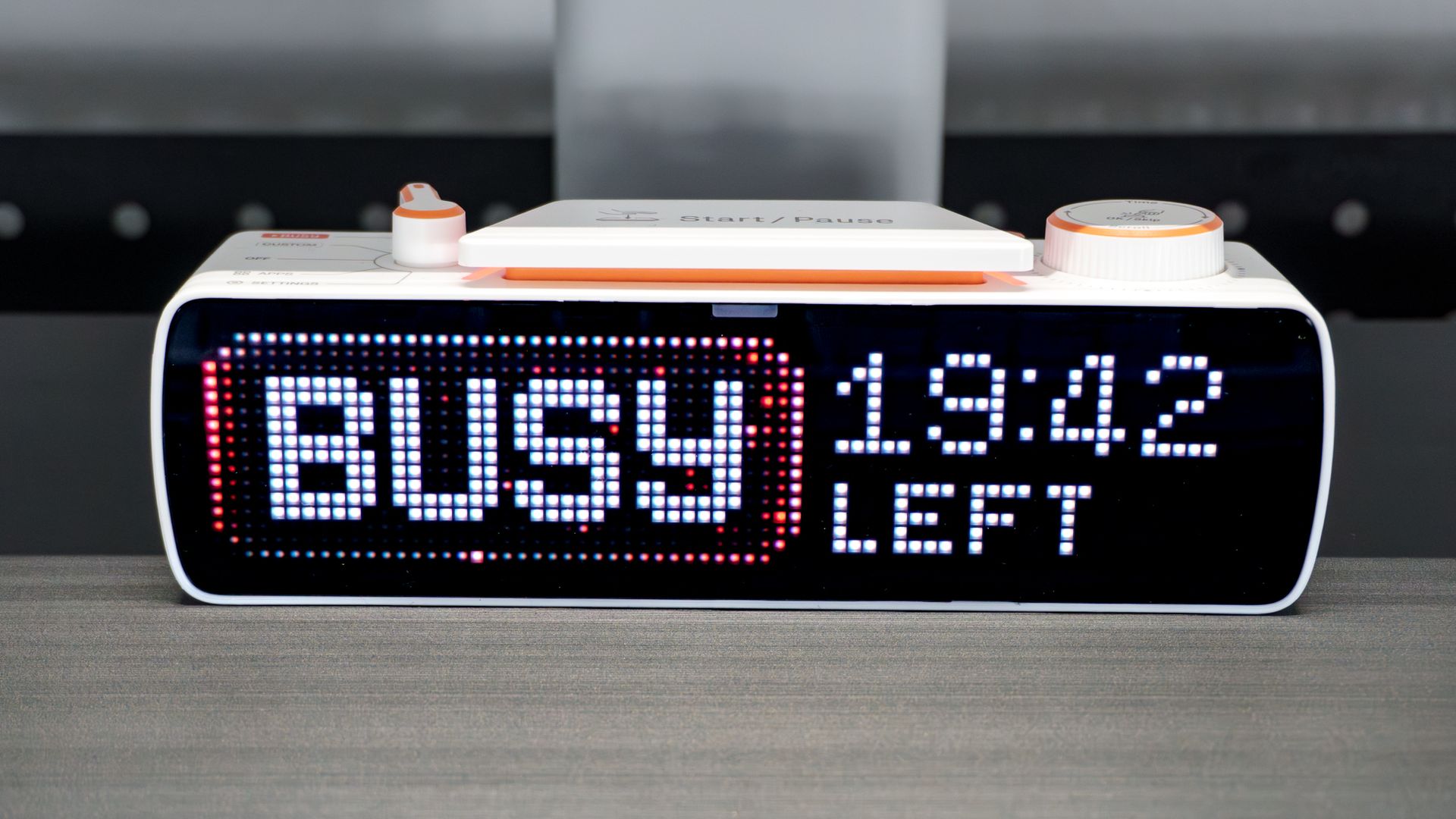
The front of the device features a bright, pixelated dot-matrix display, but the real star of the show sits right on top: tactile physical controls for adjusting settings and running your timers. There’s a selector switch on the left to toggle between different modes, a giant Start/Pause bar in the middle, and a rotary knob on the right to add time or scroll through menus.
Coming from touchscreen devices like the Nest Hub Max and Echo Show 5 , these physical controls offered a refreshing change of pace. I particularly like that the main Start/Pause bar uses the same mechanical switch mechanism you'd find in a mechanical keyboard. While the switches and dials aren’t totally silent, the quiet click they produce is soft enough for an office environment while making the whole experience of using the device genuinely fun.
On the bottom of the Busy Bar, there’s a USB-C port for charging or connecting it to your computer, right alongside two fold-out feet that let you mount it on top of your monitor like a webcam. Before trying that out, though, I wanted to see how it performed sitting directly on my desk.
Unlike the Flipper Zero — which has gotten a bit of a bad rap as a "hacking tool" — the Busy Bar is designed to help you hack your workday. Others can clearly see its large pixelated display and know not to bother you when it’s flipped to Busy. Alternatively, you can switch it to "Custom," which by default displays a "Keep Out" message complete with animated yellow warning tape.
Given that I work from home and don’t sit in a crowded office, my favorite thing about the Busy Bar so far has been its built-in Pomodoro timer . When you switch to Busy mode, the timer defaults to a 20-minute focus period followed by a five-minute rest break. The device’s built-in 0.8W speaker emits a clean chime to let you know when your interval is up, leading into a second work period with another short break in between.
What I like about this hardware-first approach is that I don’t have to pull out my phone — which usually ends up distracting me with notifications when I'm supposed to be focused. Plus, physically slamming down on the Start/Pause bar between work and rest intervals is surprisingly satisfying. Using the Busy Bar throughout my workday has genuinely helped me stay on task, especially when plowing through administrative work that would normally leave me bored out of my mind.
It isn’t just a glorified Pomodoro timer, though. Like other smart displays, it also features built-in apps. My favorite is the standard clock, which shows the current time and date. While that was essentially the only first-party app available for most of my testing period, a recent firmware update added a dedicated Weather app that includes a clock interface.
I initially tested the Busy Bar out in my game room sitting on top of my BlueAnt Soundblade soundbar, where it fit into my setup seamlessly. Eventually, I moved it into my office underneath my desk shelf where I’ve been using it ever since. At just over two inches tall, you can tuck it almost anywhere. However, mounting it on top of my monitor is what truly sold me on it as a companion gadget for a busy workspace.
With the feet pulled out, the Busy Bar perches easily on top of a monitor, just like one of the best webcams or a monitor lightbar . If your desk sits in an open workspace rather than facing a wall, people walking by can instantly see whether you’re available or wrapped up in focus time.
My favorite feature, though, is how it handles virtual meetings. When connected to my Mac with Flipper’s macOS app running, the display automatically flips to "On Call" the instant I join a meeting. Once the video call ends, it seamlessly drops back to your clock or timer.
How do you know what the Busy Bar is showing everyone else while it's resting on top of your screen? Flipper thought of that, too.
Unlike the 6.35-inch RGB LED pixel matrix on the front, the back of the Busy Bar features a secondary 1.54-inch monochrome OLED display. It mirrors whatever is showing on the main screen so you always know what people looking at your monitor are seeing. Flipper also used the extra space on either side of the back panel to include helpful quick-start guides — computer connection instructions on the left, and companion app info complete with a QR code on the right.
At the moment, Flipper hasn’t released its Windows companion app yet, though the website notes it's "Coming soon." That wasn't a dealbreaker for me since I regularly jump between operating systems when testing gear, so I downloaded the macOS app on my Mac mini M6 to get started. Just like the mobile app, the desktop software makes tweaking settings and digging into menus much easier, even if it’s a bit less tactile than using the physical dial and knob.
To get that automatic "On Call" status working when you drop into a meeting, you do need the desktop app running with the Busy Bar tethered to your computer over USB. In practice, it worked reliably, and having quick control right from the macOS Menu Bar made making adjustments effortless.
While I didn’t get a chance to test this feature out with my family at home — the school year is in full swing, after all — I could easily see it being a lifesaver during summer break when the kids are home. Plus, because you can also wall-mount the Busy Bar, it feels like a natural fit for podcasters, streamers, or anyone else who needs a clear "do not disturb" indicator while recording.
With most consumer electronics seeing price hikes lately due to the ongoing effects of RAMaggedon , I was still a bit surprised when I saw the Busy Bar’s price tag. At $249, it costs more than both the Echo Show 8 and the Google Nest Hub Max. Fortunately, the Busy Bar has been available for 20% off for the past month or so, and I hope its discounted $200 price becomes permanent.
Even at $200, you’re paying quite a bit for a device with deliberately fewer features — though that’s kind of the point, right? In Flipper’s defense, the Busy Bar is as customizable and hackable (in the best way) as the Flipper Zero.
For instance, you can integrate it with the rest of your smart home devices to turn on lights, lock your door, or pause your music the second you switch your status to "Busy". It’s a remarkably developer-friendly device too, and there’s already a growing collection of custom-made apps for it. Flipper even released a 1:1 model of the Busy Bar so you can 3D print your own custom mounts and accessories.
While its software ecosystem is still in its early stages, I’ve really enjoyed the simplicity of having the Busy Bar on my desk. It’s a great digital clock, a solid Pomodoro timer, and an ambient focus tool that lets me keep an eye on my day without getting bogged down by endless notifications.
Given how open Flipper has made the platform from the outset, the sky is truly the limit. Here’s hoping Busy Bars end up on more people’s desks and that the tinkering community has as much fun with this device as they did with the Flipper Zero — I know I have.