Webb Content Search and Filtering Help
NASA Science ·
1-Filter Definitions | 2-Filter Logic | 3- NASA Categories | 4-Dates | 5-Keyword Search | 6,7- Sorting | Back Button Issue 1) Filter Definitions FILTERS: Article Type Filters | Image Filters | Video Filters | Interactives Filters | Science Theme Filters Article Type Filters: The first tier of filters for Webb articles/pages is the specific […] The post Webb Content Search and Filtering Help appeared first on NASA Science .
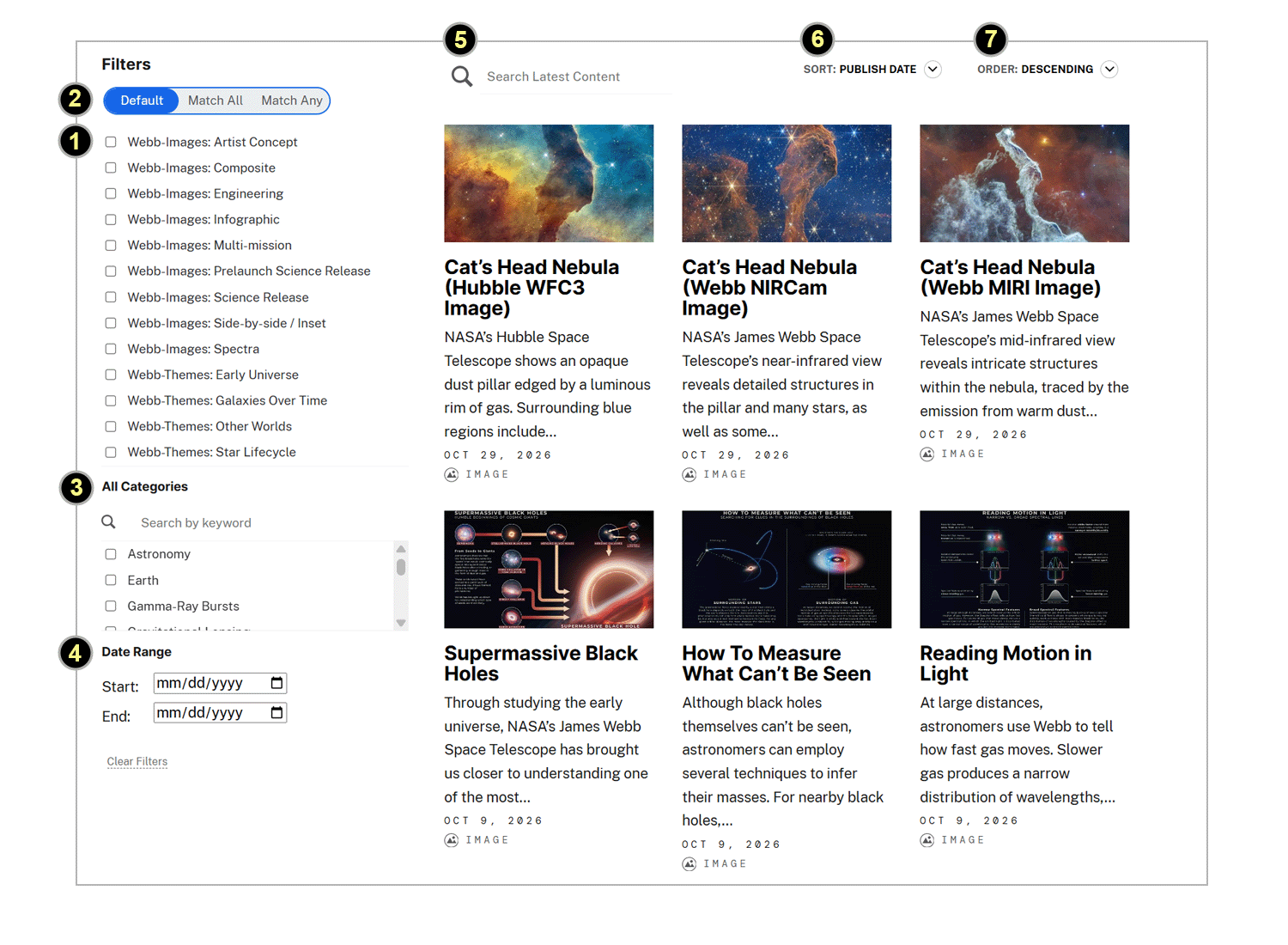
Instructions follow on how to use the search and filter features for content listing blocks that take the form of the image below. Content list blocks dynamically aggregate feeds of various content types and supply users with tools to search and filter them. There is a section below for each of the numbered elements in the numbered screenshot image below followed by additional sections.
2 – Filter Logic 3 – NASA Categories 4 – Date Ranges 5 – Keyword Search 6,7 – Sorting Back Button Issue Steve Sabia / NASA 1- Filter Definitions | 2- Filter Logic | 3- NASA Categories | 4- Dates | 5- Keyword Search | 6,7- Sorting | Back Button Issue
FILTERS : Article Type Filters | Image Filters | Video Filters | Interactives Filters | Science Theme Filters
The first tier of filters for Webb articles/pages is the specific article type used to isolate a specific type from an aggregated feed of multiple types.
Webb Science Release s: peer reviewed, NASA released, Webb science articles .
Webb Science Release Prelaunch : Webb Science articles published prior to Webb’s launch and first images. Webb Science Blogs: Blog posts fall into 3 categories: science, mission operations, engineering, this filters for only science blogs. Webb science blogs are “preprint/early release science” at the time of publishing .
Engineering : any science release, blog, image, video, etc that speaks to Webb engineering.
Mission Operations : generally blog or press releases about Webb Mission Operations issues and processes.
Webb Images : Webb images that are housed in the science.nasa.gov system, primarily Webb Science Release images but includes blog images, explainer web page and outreach images.
Webb Interactives: Interactive “STORIMap” versions of Webb Science Images. These supply an interactive way to explore images via image hotspots at various depths of zoom, image tours and more.
Webb Products : Products made from Webb Science Images such as posters, 3d printables, activities etc.
Webb Images : Webb images housed in the science.nasa.gov system, primarily Webb Science Release images but includes blog images, explainer web page and outreach images.
Webb Videos: Webb videos that are housed in the science.nasa.gov system, primarily Webb Science Release videos but includes blog videos, some explainer web page and outreach videos .
Artists Concept : images are illustrations not actual Webb imagery data.
Composite : images or image data combined from 2 or more instruments or missions into a single image.
Engineering : images of Webb hardware under developement or engineering concepts, usually associated with a Prelaunch Science Release, blog or web page.
Infographic : an “explainer/narrative” image of a scientific or engineering concept.
Instruments : enter instrument acronyms in the keyword search (label #5) to filter on specific instruments , these include NIRCam, MIRI, NIRSpec, FGS, NIRISS , as well as entering keywords for various instrument modes and filters for instance NIRSpec IFU .
Multi-Mission : images involving 2 or more mission’s data. Compares/contrasts/expands/overlays more than one mission’s data for a similar target usually as a composite or sideBySide / inset .
Science Release: images that were part of a NASA Webb Science Release article .
Science Release Prelaunch : images from Webb articles published before Webb’s launch, commissioning and first images (July 11, 2022) usually discussing “future Webb science” or Webb engineering.
SideBySide / Inset : images include a sideBySide comparison of images/data or contains an inset that is a blow up of an aspect of an image.
Spectra : images visualizing spectroscopy data
Animation / Visualization – an animation is an artists concept video. A visualization is an animation generated from or based on actual science data. There is some overlap in these terms so they are grouped.
Comparison – a comparison of 2 or more aspects of science data or results, it could be comparing imagery/data from 2 or more instruments or missions, etc
Engineering – Webb development or engineering elements or concepts.
Explainer – explains a concept or is an tour of an image/object highlighting its key elements and aspects. Has a soundtrack or text on screen (as opposed to a silent/wordless zoom-in / fly through ).
Multi-mission – contains imagery involving 2 or more mission’s data. Compares/contrasts/overlays/cross-fades more than one missions data for a same/similar target.
Outreach – video that is promoting some aspect of Webb to the general public for events, activities, information, fun, promotion, basic awareness – not science/engineering data or concepts.
Science Blog Early Release – part of Webb Blog that is early/pre-release science – not peer reviewed at time of publishing.
Science Release – part of a peer reviewed NASA science that was released as part of a Webb Science Release.
Science Release Prelaunch – part of a NASA released science article that preceded Webb’s launch and commissioning. Prelaunch releases generally featured Webb’s “future science” capabilities or endeavors as well as engineering.
Zoom-in / Fly-through – features a zoom in or fly by/through of 1 or more astronomical object(s).
Image Deep Zoom – a bandwidth efficient zoom into a high resolution image with some added features for panning and zooming the image like a thumbnail navigator panel.
Image STORImap – interactive exploration of an image with “hotspots” to explore/expand as well as tours/zooms of various key aspects of the image with explanations of their importance and more.
Webb-Interactives: Other – interactive that is not a STORIMap or Deep Zoom.
Webb-Interactives: Science Release – part of a peer reviewed, NASA/Webb Science release.
Webb-Interactives: Science Release Prelaunch – part of Webb’s prelaunch releases generally featured Webb’s “future science” capabilities or endeavors as well as engineering.
There are no products filters at this time.
There are four major Webb Science Themes . Filter on them individually or in combinations with AND/OR logic.
Early Universe – the era in the early universe when the first stars and galaxies formed.
Galaxies Over Time – both early and modern galaxies, better understand their growth and evolution.
Other Worlds – observe distant planets, orbiting other stars, what their atmospheres are made of, as well as what their climate and weather are like. Webb can also examine objects within our own solar system.
Star Lifecycle – the life cycles of stars, from star birth and planet formation to star death, wherein matter is released back into space, allowing new stars and planets to form from their remnants.
Any page on this site that is not an article, press release, science release or blog
Informational : Website pages that are not articles, press releases, science or blog releases.
Awards : Webb awards articles, pages, images, videos.
Science Explainer : Webb pages that explain a Webb science concept.
Engineering Explainer : Webb pages that explain a Webb engineering concept or milestone
You can choose the logic of how your filters are combined by selecting one of these options:
Default : The default is generally ANY/OR logic but actually depends the query for the page’s load time result set. It’s best to specifically choose one of the below options to be certain.
Match ANY (Logical OR) : Will match items tagged with ANY of the filters you have selected. EX: Composite OR Multi-MIssion OR Webb-Theme: Galaxies Over Time will match items that have 1 or more of those 3 filter tags present. The result displayed is a superset of all items matching each individual filter.
Match ALL (Logical AND) : Will match only items tagged with ALL of the filters you have selected. EX: Composite AND Multi-MIssion AND Webb-Theme: Galaxies Over Time will only match items that have ALL 3 of those filter tags present. The result displayed is a subset of items that each contain ALL 3 filters selected.
“Category” filters are a subset of the NASA Science Category Taxonomy. Those shown in the scroll box have been extracted from the initially loaded result set. You can filter the initial result set by selecting/combining Category tags. Categories exist for specific and general astronomical objects, missions, etc.
Category Search: Immediately below the subtitle “All Categories” is a search box where you can search the list of categories in the box below it which can be quite long. Do not confuse this text search box with the function of #5 – this does not search the result set . The Categories search box only searches the list of categories immediately below it to help you navigate a potentially long list.
NOTE : if you set category filters and they “scroll away” out of view, you can often forget they are set and end up with results that appear confusing. In these cases it useful to check your category settings by scrolling through the entire box, possibly resetting them.
Filtered results show items that match the filter selections for all available dates, you can narrow the date range (#4) if desired and then continue to filter within that date range.
Text entered into the search box labelled #5 searches all text in the items displayed (which may or may not have filters applied). You can enter multiple individual words (EX: nebula MIRI ) to match those words anywhere in the article text or you can surround them in quotes to match a specific phase (EX: “carina nebula MIRI”) giving more specific results.
Don’t confuse it with the Category Search #3 : the text box in #3 only searches the list of categories immediately below it. It does not search the matching entries in the result set displayed.
How are Search Keywords Combined with Filters ? Search terms entered in the search box narrow the result set to the matching items. Filters can be applied to the result set before or after keyword search to further narrow the result set. NOTE: the filters are ANDED with the results of the keyword search regardless of logic choice.
You can sort the results by publish date, title, date modified (#6). You can set the sort order (#7) in descending (newest first) or ascending (oldest first) or in the case of title, ascending = alphabetical or descending = reverse alphabetical.
If you leave the search/filter page after setting filters and/or a keyword search, and return to it – for example you click through on a result item to view it and then hit the back button , Your filter settings and keywords are still displayed but the results revert back to the originally loaded FULL result set. You have to reapply the filters and keyword search to get the same filtered result subset. This issue is being worked on.
The post Webb Content Search and Filtering Help appeared first on NASA Science .