I've been testing the iPhone Duo for 2 weeks — here's what I like (and what I don't)
Latest from Tom's Guide ·
Jeff is U.K. Editor-in-Chief for Tom’s Guide looking after the day-to-day output of the site’s British contingent. Rising early and heading straight for the coffee machine, Jeff loves nothing more than dialling into the zeitgeist of the day’s tech news. A journalist for over a decade, he's travelled around the world testing and reviewing any gadget he can get his hands on. Before joining the team at Tom’s Guide, Jeff covered technology and science for two of the U.K.’s biggest national news sites: Metro.co.uk and the Daily Mirror. Memorable moments include getting lost in Vienna in an electric Audi, touring Lockheed Martin’s mile-long jet factory in Fort Worth and filming a Netflix documentary about Elon Musk in West London. When not plugged into the current news agenda, editing or commissioning a series of articles or debating the merits of Apple vs Android, Jeff can usually be found out for a run trying to shave precious seconds off his PB. Or lifting weights in a vain attempt to offset the ageing process.
You can't fairly judge a phone's true merits after a few hours, or even a few days. I’ve been using the iPhone Duo as my daily driver for the last fortnight, and now feel I’ve had time to take stock of what shines (and what doesn’t) when it comes to Apple’s first foldable phone.
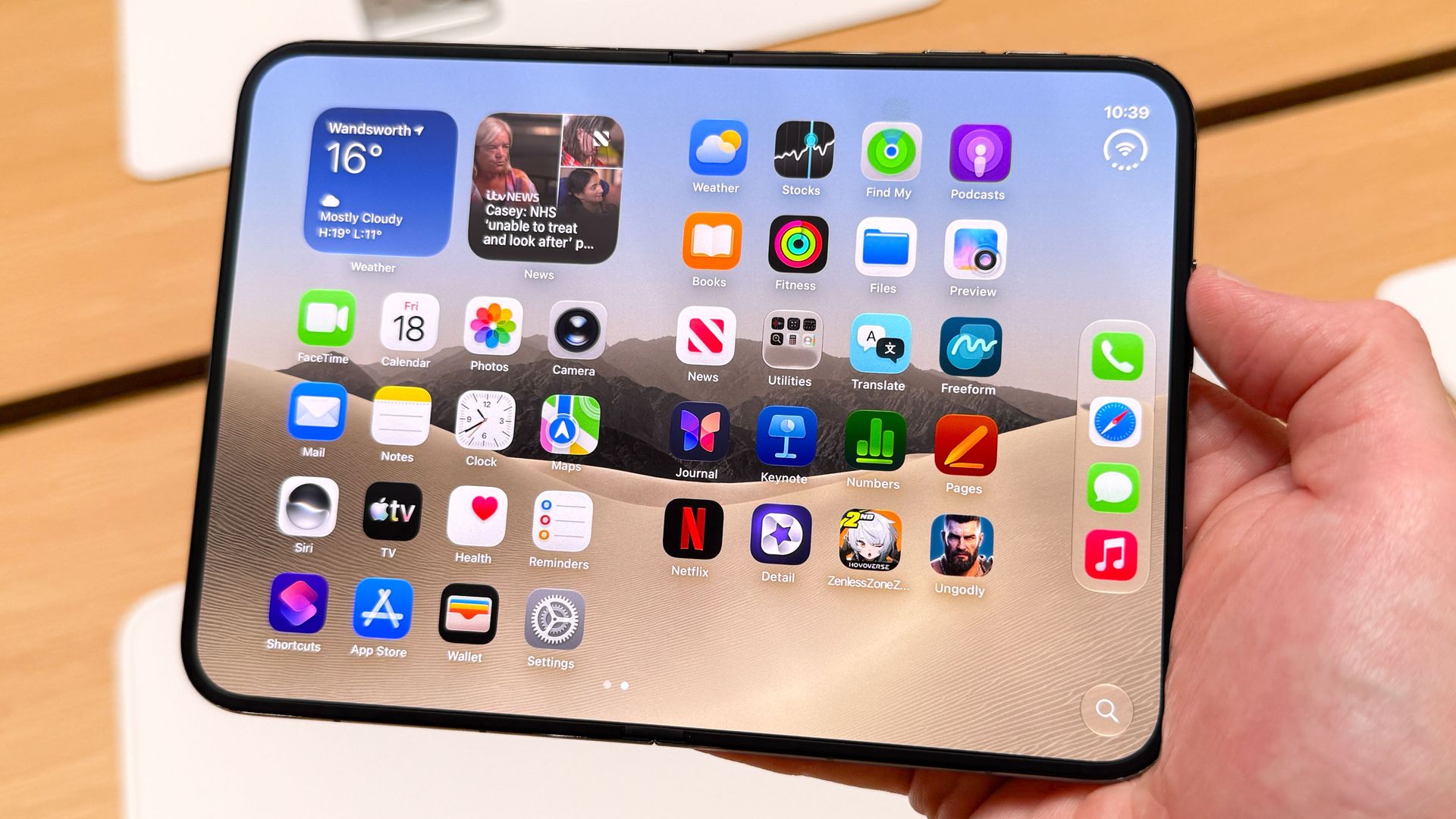
Is this one of the best foldable phones you can buy? Unquestionably. But that doesn’t mean there aren’t some imperfections to be wary of. The good news for anyone on the fence about this $2,000 handset is that even after 14 days, the wow factor hasn’t worn off. Folding away what's essentially an iPad mini and tucking it into your pocket just doesn’t get old — even though I wish more of the apps were optimized for the 1:4:1 aspect ratio displays.
The iPhone Duo is a first-generation product, and it offers a different proposition from the tried-and-tested formula of the iPhone 18 Pro and iPhone 18 Pro Max . But even when you compare the Duo to Samsung’s eighth iteration of a foldable phone, it’s impressive just how much Apple has got right.
Speaking of the Galaxy Z Fold 8 , I’ve seen a lot of reviewers — including my colleague Mark Spoonauer — wishing the Duo was closer to that phone’s 201g weight. When I first picked up the Duo at Apple HQ , I didn’t mind the 254g weight — and I still don’t. It’s concentrated when folded but balances out when the device is open. The iPhone Duo 2 will surely trim the fat a bit, but for me the extra heft isn’t a strike against the Duo yet.
Here are a few other things that I like best about the iPhone Duo
It’s obvious, I know — but being able to run two apps simultaneously on my iPhone has proved a huge productivity win time and time again. For example, we cover a lot of live events at Tom’s Guide, and the iPhone Duo lets me keep Slack open on one panel with a livestream broadcast locked to the other.
It also makes uploading images a cinch. Keep the Photos app open on the left with Google Drive on the right, and you can just drag and drop pictures into your desired location. It’s a huge time-saver that I’ve gotten very used to.
This Duo-exclusive feature hasn’t been getting as much appreciation as I’d have thought, considering we’re accelerating towards Thanksgiving and the holidays at an alarming rate. If, like me, you’ll be trying to get sugar-fueled children to sit still for Christmas photos, this camera trick will come in clutch.
Fire up the Duo’s camera and when the phone is unfolded the outer screen will play some clips of Snoopy to grab their attention while you snap the perfect portrait shot. The only downside I’ve noticed is that the kids won’t be looking exactly at the camera because the Duo’s 48MP Dual Fusion camera is positioned to the side. Still, it’s a pretty ingenious little feature that’ll earn its stripes on Thanksgiving weekend.
Every single workday for years, my phone has sat face up on the desk, occasionally illuminating with a notification or a call. Since I started using the iPhone Duo, I prop the little guy up in “Tent Mode” , where the outer display shows my calendar, a photo slideshow or the music I’m listening to. If needed, you can also stream content on the outer display.
For the most part, I use it to display multiple time zones at a glance. I’m based in London and routinely need to work with colleagues in New York and Los Angeles. It’s true you can achieve the same effect with a regular iPhone and a MagSafe stand, but if you’re hot desking or working from coffee shops, then being able to prop the iPhone Duo into StandBy mode all by itself is a big win.
As I said at the outset, not everything is perfect with this phone, and there are a couple of things that give me pause when I get asked if the Duo is worth the price of admission. I’ve already mentioned app incompatibility, so I won’t rehash that here, but here are the two big sticking points that I bump into again and again when using the iPhone as my daily driver.
Apple is reportedly actively working on Face ID for the iPhone Duo 2 (along with adding an Action Button) and it can’t come soon enough. I don’t have anything necessarily against Touch ID — except in this case because I’m left-handed. When I’m using my right hand, I can swipe up, thumb the power switch and unlock the Duo in a split second.
But the majority of the time, I instinctively pick up my phone with my left hand and curl my index finger around the back to hit the button that way. I’ve grown accustomed to it but it’s slower and more awkward than Face ID and feels like a step backwards in usability.
The latest development beta includes something of a workaround: users will be able to activate the front-facing camera to unlock the phone within a 45-minute window of using their passcode or Touch ID. It's still in the early stages, but it could become a huge accessibility boost for lefties like myself.
Smaller tablets make for excellent notebook replacements, and this was one of the things I was most looking forward to using the iPhone Duo for . Alas, the only Apple Pencil I have in my possession is the Apple Pencil 2nd Generation from an aging iPad Pro. Which means I need to buy the Apple Pencil (USB-C) in order to use with my Duo.
I’ll admit, this is a minor hang-up; I expect many people already own the $75 Apple Pencil (USB-C) and are happy to have it working on the Duo. I’m just not one of them and would have appreciated if the $2,000 iPhone Duo worked with serviceable Apple tech I already own, rather than having to spend even more money to unlock its full potential.
Still, the good news is the Apple Pencil (USB-C) is currently reduced in the Black Friday sales, so if — like me — you haven’t picked up one to work with your Duo yet, now is the time to do so.
Pencil (USB-C): was $79 now $69 If you're looking for a basic stylus for your iPad or iPhone Duo, look no further. Apple's cheapest Pencil doesn't have premium features like pressure sensitivity or wireless charging, but it does offer pixel-perfect precision and everything you need for writing and drawing. View Deal