I used the new Kindle (2026) for a week — and it’s the best entry-level ereader yet
Latest from Tom's Guide ·
null
The Amazon Kindle (2026) delivers several meaningful updates for Amazon’s popular e-reader. And while these upgrades make for a more pleasant reading experience, they come at a steeper price for this entry-level model.
Unlike the Amazon Kindle (2024) and prior iterations, the new Kindle features a flush display for a streamlined look, similar to the Kindle Paperwhite and Kindle Colorsoft. Like those two higher-end models, you can upgrade to a Kindle with an aluminum design. The power button is now on the right-hand side of the device instead of at the bottom.
This is certainly one of the best Kindles , but it’s not perfect. The main sticking point is the new $149 asking price — which is a lot for an e-reader without adjustable warm light. The new plastic design no longer feels cheap, but even that doesn’t make the $40 price bump easier to swallow. And if you want the aluminum version, prepare to pay $189.
If you’re brand-new to Kindles and want to see what they’re all about, the asking price might be worth it, since it still delivers a fantastic e-reading experience and a robust digital library. However, if you own an older model, you won’t miss much by skipping this iteration. Find out more in my full review of the Kindle (2026).
Kindle 2026 (starting)
Kindle 2026 (aluminum)
Price
$149
$189
Display
6-inch 300ppi
6-inch 300ppi
Storage
16GB
32GB
Front light
Yes (no warm light)
Yes (no warm light)
Battery life
6 weeks (rated)
6 weeks (rated)
Ports
1x USB-C
1x USB-C
Connectivity
Wi-Fi
Wi-Fi
Waterproof
No
No
Colors
Graphite, Ube
Alpine Sky Aluminum, Seaglass Green Aluminum
Dimensions
4.3 x 6.0 x 0.3 inches
4.3 x 6.0 x 0.3 inches
Weight
4.9 oz
5.7 oz
There’s a lot to like about the new Kindle, including its sharp, flush display, streamlined, portable design, snappy interface, and long battery life.
The new Kindle has been streamlined with more rounded edges and a slightly thinner profile. The most immediate difference is that the display is now flush with the bezels, so there’s no longer a gap between them. Thanks to these changes, the Kindle now appears closer to the Paperwhite and Colorsoft , just smaller.
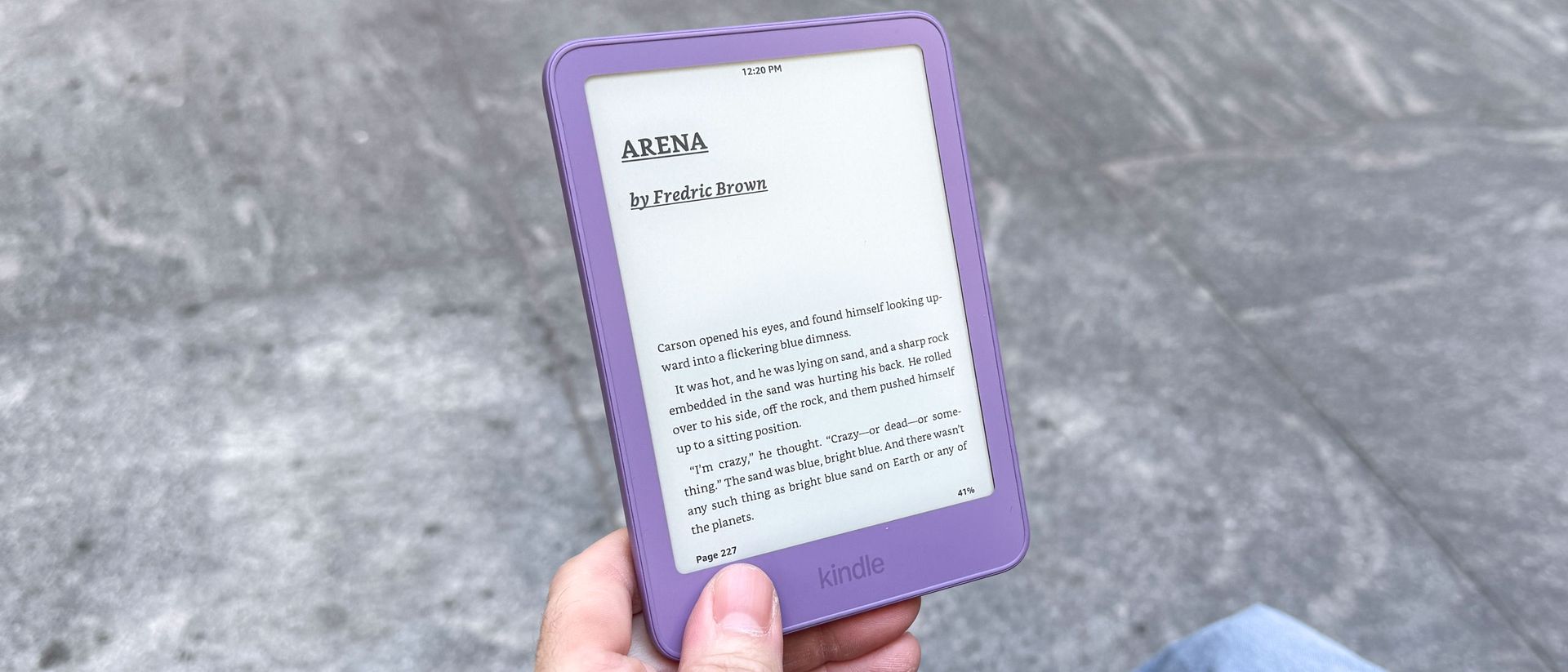
This Kindle has a plastic chassis, but it feels more premium thanks to its slightly rougher texture and rigidity. That “hollow” sound you’d experience when tapping the tablet’s back is completely gone. The bezels are generally the same size as before, especially the larger bottom one where you’d generally place your thumb when reading.
The other big change is that the power button has been repositioned from the bottom to the right-hand side. The Kindle Scribe also has its power button in the same location, so it’s good to see this and the other new Kindles follow suit. Not accidentally pressing the power button is a huge game-changer, and I’m glad Amazon finally fixed it.
My review unit came in the new Ube color, which is a fancy name for purple. Graphite (or black) is good for a more traditional look, but I’m a fan of Ube since it gives the Kindle some flair.
I also tested the aluminum model, and it's my favorite to hold because it feels like a smartphone. This model weighs slightly more than the non-aluminum model, but it doesn’t feel uncomfortable to hold even over long periods.
Aside from the flush design, the display is virtually identical to the previous one, with its 6-inch size and 300ppi resolution. This resolution matches that of the larger Kindles, so you still get a reading experience that’s pleasing and easy on the eyes.
There’s no adjustable warm light (more on that later), but as before, you can turn the brightness up fairly high or turn it off completely. But whether you read with the front lights on or off, the black text on white backgrounds looks sharp and defined. The same is true in dark mode. If you find it hard to read, you can always go into a book’s settings to adjust the font size, font type, line spacing, and more.
There’s a slight drawback for comic book fans. Unless you have excellent vision or don’t mind pinching and zooming, you’re going to have a hard time reading your favorite stories on this device due to the 6-inch screen. Manga, with its larger panels and often fewer dialogue balloons, fares a bit better, but the Kindle is best for reading standard text.
Lastly, while Amazon advertises that the Kindle has a glare-free display, that’s not entirely accurate. Don’t get me wrong, you get significantly less glare on this device than you would on a tablet with a glossy display. However, if you’re under direct sunlight, you’ll still see a diffuse glare. If that happens, you’ll need to adjust your viewing angle to compensate for the glare—or find a nice shaded area.
One of the best things about Kindles is their epic battery life, and this one is no different. Amazon says you can get 6 weeks of battery life on this device. While I haven’t used it long enough to test that claim, I expect this Kindle will last just as long on a single charge as older models I’ve used.
To get the 6 weeks of battery Amazon touts, you’ll need to shut off wireless, read about 30 minutes per day, and keep the backlight at 13. If you’re an avid reader, then you’ll likely read for much longer per day. You might also want to bump up the brightness. This will drain the battery faster, but you’ll likely still get a good two or three weeks before you need to recharge.
As for me, I read about an hour on a weekday and about two to three hours a day on the weekend, with the backlight off and Wi-Fi enabled. I’ve used the Kindle for about a week, and the battery is around 83%, down from 95% when I began reading. Doing the math, it’ll likely be a few more weeks before I have to recharge, which is awesome.
If you’re familiar with Kindles, then you’ll be at home here, as it’s largely the same experience as before.
On the Home page, you’ll see a list of all the books you’re currently reading or have recently purchased from Amazon’s site or your Kindle. Directly below that is a “Top Picks For You” section that features books similar to those in your library. The same is true for the top Kindle Unlimited and other sections further down. For the most part, the recommendations are pretty spot on.
From the dropdown menu, you can enable features like airplane mode, Bluetooth, Dark Mode, and sync. The Settings submenu lets you view device information, wireless settings, software updates, and more. This is largely the same as on previous models.
The Kindle's dropdown menu is the main hub for enabling settings such as airplane mode, Bluetooth , sync, brightness, and dark mode. You can also jump to the settings page from here. In the settings menu, you can view device information and wireless settings, but don't expect the kind of robust settings menu found on the best phones .
You get more options when you’re actually reading a book, as I mentioned before. Beyond those, you can skip to specific chapters, highlight words or sections, get dictionary definitions, and more. The dictionary feature is especially handy when reading old books with unfamiliar words.
Kindle store and Goodreads integrations are present, and they’re a nice way to easily purchase your next read or update friends on your book progress (respectively). Some aren’t fond of Goodreads, but it’s one of my favorite social platforms—and a good way to track how many books I’ve read each year.
Though I’m a big fan of the Kindle, it has some flaws worth discussing.
One of the entry-level Kindle’s main selling points was its relative affordability. While the new Kindle isn’t exorbitantly priced, it still stings that it costs $40 more than the previous model.
I can’t say the higher asking price won’t be worth it to everyone, as the upgrades do make for a better e-reader. However, as much as I appreciate the new chassis, repositioned power button, and flush display, they’re not essential — especially if you’re happy with the Kindle you own.
Amazon always has Kindle sales, especially during Black Friday or its own Amazon Prime Day events. So my advice is to wait for one of those times if you’re considering buying a new Kindle.
People weren’t happy that previous basic Kindles lacked adjustable warm light like the Paperwhite and Colorsoft. I always forgave this due to the Kindle’s relative affordability. However, at the new $149 sticker price, I think this should have been standard.
If you’re like me and mostly read with the Kindle’s lights off while sitting by an external light source, then you won’t miss adjustable warm light. But if you need a front-lit screen to help you read and you’re trying to minimize your exposure to blue light, you might be frustrated that you don’t have the warm light option.
The basic Kindle is now more like its larger siblings, which is both a blessing and a curse. The flush display and sturdy design make it feel more premium. Objectively, this is the finest Kindle yet. However, those upgrades come at a cost, which puts the once super-affordable Kindle closer in price to the Paperwhite and Colorsoft — though those are also more expensive than before.
That said, if the price doesn’t deter you and you want a top-of-the-line basic Kindle, you won’t go wrong with this model. This is especially true if you splurge on the $189 aluminum model. If you’re using a Kindle that’s half a decade old, or if you’re brand-new to the Kindle ecosystem, you’ll be impressed by what this small wonder offers.