I used the Lenovo ThinkPad X1 Carbon Gen 14 Aura Edition for 3 months: it's light, sustainable, and has a gorgeous OLED display
Latest from Tom's Guide ·
null
I've tested a few Lenovo ThinkPad X1 Carbon models over the years, and I've always been a fan. But while I enjoyed using them, I didn't like the fact that they were extremely difficult to repair if any internal components went haywire. The Gen 14 Aura Edition is the first version where Lenovo has actually addressed that.
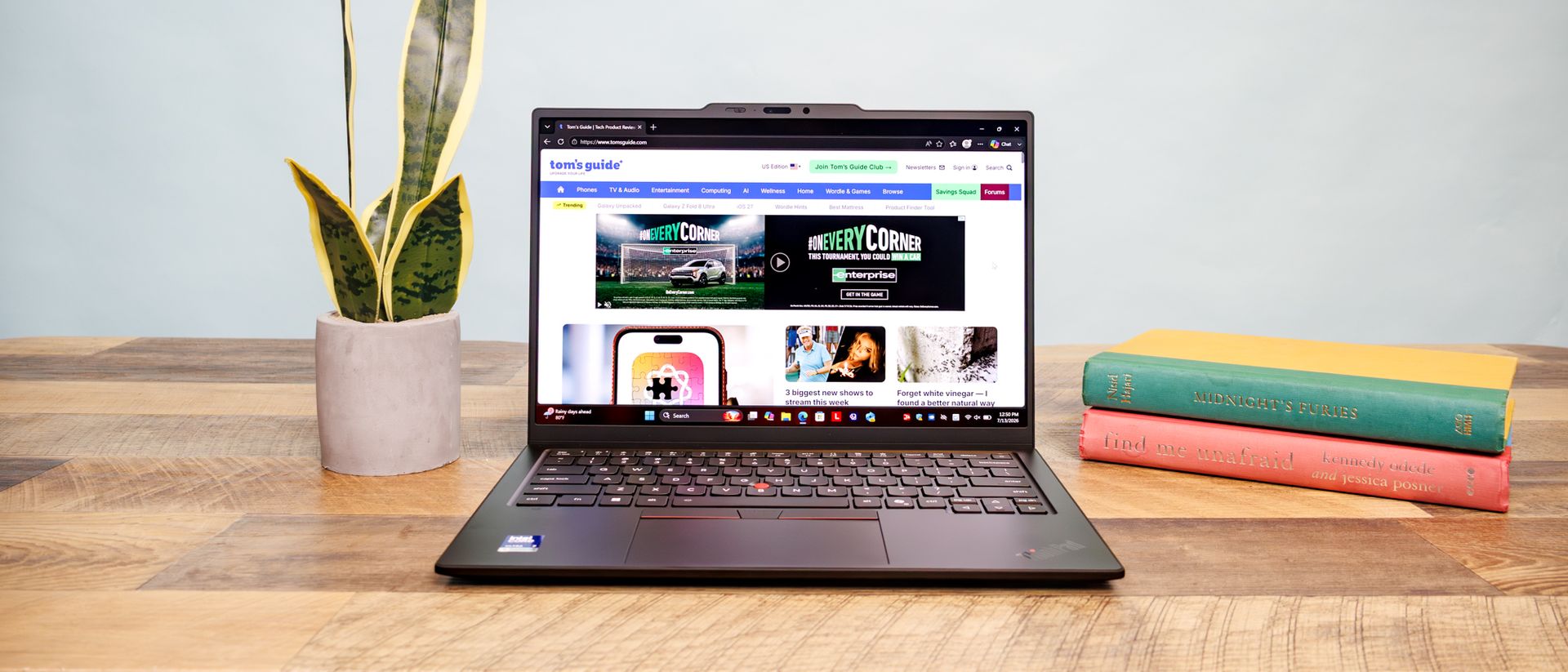
Built around Intel's Panther Lake processors , the X1 Carbon Gen 14 Aura Edition still brings everything you'd expect from this line, including an absurdly light build, a fantastic keyboard, and a beautiful OLED display.
But this time around, Lenovo redesigned the internals around what it calls a "Space Frame," a smaller, double-sided system board that makes the device easier to repair or swap parts. Same weight and feel, but less of a headache if you ever need to pop the hood.
It's not a perfect machine, but if you want a laptop that can survive years of travel and IT tickets, the Lenovo ThinkPad X1 Carbon Gen 14 Aura Edition deserves your consideration.
CPU
Intel Core Ultra 7 355
RAM
32GB
Storage
512GB SSD
Display
14-inch 2880x1800 OLED display
Ports
3 x USB-C, USB-A, HDMI 2.1, 3.5mm headphone jack
Wireless connectivity
Wi-Fi 7
Battery
57 Wh
Dimensions
12.34 x 8.63 x 0.64 inches
Weight
2.15 pounds
Price
$2,139
Whenever it comes to a straight forward no-frills laptop for work, the ThinkPad X1 Carbon is a usual go-to. And the improvements made across the board reinforce its status.
The first thing I noticed when I picked up the X1 Carbon Gen 14 was how little it weighs. At 2.15 pounds, I genuinely had to double-check my bag before leaving the office to make sure I packed it. That's a well-known selling point for the X1 Carbon line, but what's new here is what's on the inside.
Lenovo rebuilt the internal layout around a "Space Frame" design: a smaller, double-sided system board that shrinks the internal footprint by about 20% and leaves more room for modular components. The SSD, battery, keyboard, and USB-C ports are all replaceable now. It also gave Lenovo room to put in a larger fan, which is exactly what you want with a more powerful Panther Lake chip inside.
Older ThinkPads had a more complicated internal layout that made repairs tougher and hurt their sustainability, but with the Gen 14, you can get more life out of the computer instead of buying a new one when a single part goes south.
In a tech landscape that's been marred by RAM shortages and never-ending price increases, products that last matter more than ever. If you're the type of person who keeps their laptops until the wheels fall off, that matters a lot more than a marginal spec bump.
I spent most of my review period using the X1 Carbon Gen 14 the way most will: writing, emailing, and juggling too many browser tabs. It handled every bit of that workload without a hitch, and its Panther Lake chip actually beat out pricier rivals in multi-core work.
Laptop
Geekbench 6 single-core
Geekbench 6 multi-core
Lenovo ThinkPad X1 Carbon Gen 14
2635
11107
MacBook Pro M5
4191
17276
Asus Zenbook Duo
3031
17283
Dell XPS 14
2685
7964
Where it falls behind a bit is in the graphics department. Lenovo stuck with Intel's baseline integrated graphics here instead of the beefier Arc silicon that's in some other Panther Lake laptops, and it shows.
3DMark test
Lenovo ThinkPad X1 Carbon Gen 14
MacBook Pro M5
Asus Zenbook Duo
Fire Strike
12815
n/a
13851
Steel Nomad
596
1084
1483
Time Spy
3356
n/a
6814
But that's the trade-off you make for a business laptop, and in my opinion, it's the right one for what this machine is built to do. As long as you stick to the basics and don't try to edit a feature film on this thing, you'll be more than happy with what you get.
Splurge for the 2.8K OLED panel option, and you'll get one of the nicest displays I've tested at this price point. It's bright, sharp, and colorful, with excellent contrast and a 120Hz refresh rate that makes even basic scrolling feel smoother than ever.
Color gamut coverage comes in at around 82% DCI-P3, putting it right up there with the MacBook Pro and just a step behind the Asus Zenbook Duo .
Laptop
Display average brightness (nits)
DCI-P3 color gamut (closer to 100% is better)
Lenovo ThinkPad X1 Carbon Gen 14
472
82%
MacBook Pro M5
455
83%
Asus Zenbook Duo
435
87.2%
Dell XPS 14
465
71.4%
If you don't care about the resolution bump or OLED contrast, the base 1920 x 1200 IPS panel is still a solid display, and it'll cost less in both price and battery life.
ThinkPads have been a staple in the "best laptop keyboard" conversation for years, and the X1 Carbon Gen 14 is no different.
The keys are cushioned but still have great tactile feedback, and the backlighting is actually bright enough to use in a dark room.
The TrackPoint nub is still tucked into the middle of the keyboard for the handful of people who use it, and the mechanical trackpad clicks with a satisfying amount of resistance.
I'm not usually impressed by stock speakers on a business laptop, but these caught me off guard. They're loud, clear, and the Dolby Atmos tuning adds a lot of depth to whatever you're listening to.
I normally use a pair of headphones with my laptop, but the ThinkPad X1 Carbon Gen 14 Aura Edition made me reconsider that choice.
But alas, the same things that are hitting the laptop market as a whole come to bite the X1 Carbon — namely RAMageddon .
The ThinkPad X1 Carbon Gen 14 Aura Edition is not a cheap laptop. The base configuration starts at around $2,139, and once you add the OLED display, more RAM, and extra storage, you're well past that.
Go all-in on a fully maxed-out build, and you can blow past $3,200 easily. Some individual upgrades are cheap on their own, but they add up quickly once you start checking more boxes.
Is it a dealbreaker? Not really. You're still getting a premium laptop for that money, and Lenovo runs sales often enough that you can usually save a few hundred bucks if you're patient. But if the price is a hard line for you, look at something like the Dell XPS 14 for a similar laptop at a lower price.
The ThinkPad X1 Carbon Gen 14 Aura Edition had an okay battery life during my testing at 13 hours. That's not terrible, but it falls behind the Asus Zenbook Duo and is nowhere close to the MacBook Pro's roughly 16 hours.
Laptop
Web browsing battery life test result (hh:mm)
Lenovo ThinkPad X1 Carbon Gen 14
13:09
MacBook Pro M5
15:37
Asus Zenbook Duo (keyboard attached)
14:23
Dell XPS 14
20:41
Stick with the base IPS display instead, and you'll likely see better battery performance, so decide how much the OLED screen actually matters to you before you tick that box.
It's not exactly a shock given what this laptop is designed for, but the X1 Carbon Gen 14 Aura Edition isn't up for anything too graphics-intensive.
The integrated Intel graphics can handle everyday use just fine, but they fall short of competitors running higher-end integrated GPUs, let alone dedicated ones. If your day-to-day involves video editing or gaming, this isn't the laptop for you.
The Lenovo ThinkPad X1 Carbon Gen 14 Aura Edition isn't for everyone, but for the person who needs a laptop that can travel anywhere, handle everyday tasks, and last as long as possible, it's one of the better options out there.
The new "Space Frame" chassis is one of the most meaningful updates to this model, and Lenovo managed to include it without adding any weight to what was already one of the lightest 14-inch laptops around.
The keyboard is still one of the best you'll find on a laptop, the OLED display is beautiful, and the speakers genuinely caught me off guard. Just know what you're signing up for in price and graphics performance before going in.
If you're looking for an alternative, you can get a 14-inch MacBook Pro with the M5 Pro chip for a similar price, which nets you more processing power and a much longer battery life.
But you won't get the same access to the MacBook's internals that you do with the ThinkPad X1 Carbon, so you'll have to decide which pros and cons matter most to you. If you'd rather spend less, the Dell XPS 14 is a close, budget-friendly option.