Directions for Recording Talent Marketplace Videos
NASA Science ·
(Download Word Document here) It is easy to record a 5-7 minute video in Teams and upload it to your Talent Marketplace application. If you have any questions or concerns, please contact Amy Treat at amy.a.treat@nasa.gov or Paola Ortiz at paola.c.ortizperez@nasa.gov. 1. Create a meeting invite in Outlook and invite yourself to “Record LEADS Video.” […] The post Directions for Recording Talent Marketplace Videos appeared first on NASA Science .
( Download Word Document here )
It is easy to record a 5-7 minute video in Teams and upload it to your Talent Marketplace application. If you have any questions or concerns, please contact Amy Treat at amy.a.treat@nasa.gov or Paola Ortiz at paola.c.ortizperez@nasa.gov.
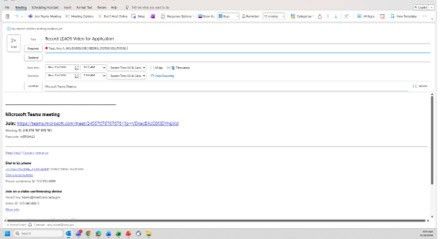
1. Create a meeting invite in Outlook and invite yourself to “Record LEADS Video.”
2. Join the meeting in a new Teams window. Make sure you are sitting comfortably in a quiet location. Once you are in the meeting, click on More (…) . Choose Record and Transcribe . Then Start Recording .
3. Make sure you are recording your video in English and record Video and Audio.
4. When you are finished recording, go back to the More (…) and choose Stop Recording. The file will automatically save to your OneDrive.
5. Go to OneDrive and sign in with your work account. Click on My Files in the left sidebar.
6. Open the folder named Recordings and find your video file.
7. Go to your application and click Attach or Upload, then select the downloaded file.
The post Directions for Recording Talent Marketplace Videos appeared first on NASA Science .